

Known System Discovery

Last Updated : May 26, 2015 |

The Select IP Office menu normally displays systems discovered by Manager using either UDP broadcast and or TCP requests. Manager can be configured to also record details of discovered units and then display a list of those previously discovered ('known') systems.

Configuring Manager for Known System Discovery

About this task

Use of known systems discovery is not enabled by default. The Manager must be configured for the feature with a file location to which it can store and retrieve known system details.

Procedure

  1. Select File | Change Working Directory.
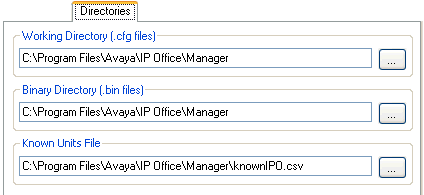


  2. In the Known Units File field, enter the directory path and file name for a CSV file into which Manager can write details of the systems it discovers.

    If the file specified does not exist it will be created by Manager.

  3. Click OK.

Using Known System Discovery

Procedure

  1. When the Select IP Office screen is displayed click on Known Units.
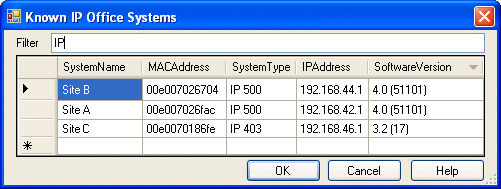


  2. The screen displays the list of systems previously discovered and stored in the CSV file.
  3. To select an control unit, highlight the row containing unit data and click OK.

    The selected unit will appear in the Select IP Office window.

  4. To filter displayed units, type the first few characters of the unit name in the Filter field.

    Any unit whose name does not match the filter will be temporarily hidden.

  5. Each discovery appends data to the known unit list.

    It is possible that details of some records in the list may be out of date. Right clicking on the leftmost (grey) column of any row will bring up a floating menu offering the options of Refresh and Delete.

  6. A new record may be manually added without having to access the system first through normal discovery.

    Enter the IP address of the new system in the IP Address column of the blank row shown with a * and select Refresh from the floating menu. This will update the Known Units file with data relating to the unit with the specified address.

  7. Select Cancel to return to the Select IP Office menu.

Result

Note:
  • The key used by the Known Systems CSV file is the IP address. The file cannot contain records for separate systems that use the same IP address for access.

  • The file can be made read only. In that case any attempts using Manager to update the file will be ignored.