

AVAYA DOCUMENTATION CENTER
Find answers to your technical questions and learn how to use our products
Administering Avaya IP Office using Manager
Joining Calls
Appearance buttons can be used to "join" existing calls and create a conference call. A user can join calls that are shown on their phone as 'in use elsewhere'.
This feature is often referred to as 'bridging into a call'. However this causes confusion with Bridged appearance buttons and so the term should be avoided.
The ability to join calls is controlled by the following feature which can be set for each user:
Cannot be Intruded: Default = On
If this option is set on for the user who has been in the call the longest, no other user can join the call. If that user leaves the call, the status is taken from the next internal user who has been in the call the longest. The exceptions are:
Voicemail calls are treated as Cannot be Intruded at all times.
When an external call is routed off switch by a user who then leaves the call, the Cannot be Intruded status used is that of the user who forwarded the call off switch.
Any call that does not involve an internal user at any stage is treated as Cannot be Intruded on. For example:
When an external call is routed off switch automatically using a short code in the incoming call route.
multi-site network calls from other systems that are routed off-switch.
VoIP calls from a device not registered on the system.
The Can Intrude setting is not used for joining calls using appearance buttons.
The following also apply:
Inaccessible - In addition to the use of the Cannot be Intruded setting above, a call is inaccessible if:
The call is still being dialed, ringing or routed.
It is a ringback call, for example a call timing out from hold or park.
If all the internal parties, if two or more, involved in the call have placed it on hold.
Conferencing Resources - The ability to bridge depends on the available conferencing resource of the system. Those resources are limited and will vary with the number of existing parties in bridged calls and conferences. The possible amount of conferencing resource depends on the system type and whether Conferencing Center is also installed.
Conference Tone - When a call is joined, all parties in the call hear the system conferencing tones. By default this is a single tone when a party joins the call and a double-tone when a party leaves the call. This is a system setting.
Holding a Bridged Call - If a user puts a call they joined on hold, it is their connection to the joined call (conference) that is put on hold. The other parties within the call remain connected and can continue talking. This will be reflected by the button status indicators. The user who pressed hold will show 'on hold here' on the button they used to join the call. All other appearance users will still show 'in use here'.
Maximum Two Analog Trunks - Only a maximum of two analog trunks can be included in a conference call.
Parked Calls - A Line Appearance button may indicate that a call is in progress on that line. Such calls to be unparked using a line appearance.
Joining Example 1: Joining with a Bridged Appearance
In this example, the user joins a call using a bridged appearance button. Answer Pre-Select is off.
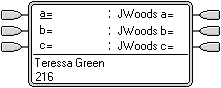 |
User with Bridged Appearance Buttons The user has bridged appearance buttons that match their colleagues call appearance buttons. |
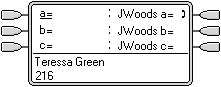 |
Call on Bridged Appearance The colleague has a call in progress on their first call appearance. This is matched on the first bridged appearance button. |
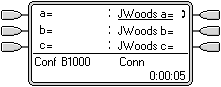 |
User Joins the Call Pressing the bridged appearance button will take our user off hook and join them into their colleagues call, creating a conference call. |
Joining Example 2: Joining with a Line Appearance
In this example, the user joins a call by pressing a line appearance button. Answer Pre-Select is off.
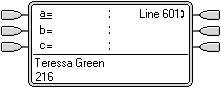 |
Line Goes Active A call is active on the line with line ID number 601. If this is an incoming call, it will show active but will not alert until its call routing has been determined. On ICLID analog lines, alerting is delayed until the ICLID that might be used to do that routing has been received. |
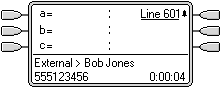 |
Line Appearance Alerting The call routing is completed and the call is now ringing against its target. The line appearance also begins alerting and Ringing Line Preference has made it the current selected button. |
|
|
Call Answered Alerting on the line appearance has stopped but the line is still active. This indicates that the call has probably been answered. As our user's phone is idle, Idle Line Preference has returned the current select button to the first available call appearance button. |
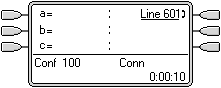 |
User Joins the Call Our extension user has been asked by their colleague to join the call just answered on line 601. By pressing the line appearance button they have joined the call on that line and created a conference call. |