

AVAYA DOCUMENTATION CENTER
Find answers to your technical questions and learn how to use our products
Administering Avaya IP Office using Manager
Access Control
The IP Office uses service user and rights group settings to control access to the IP Office settings. All connections to an IP Office service require a service user name and password. That service user must be a member of a rights group with permission to access the require service and perform the required actions.
Example Rights Assignment
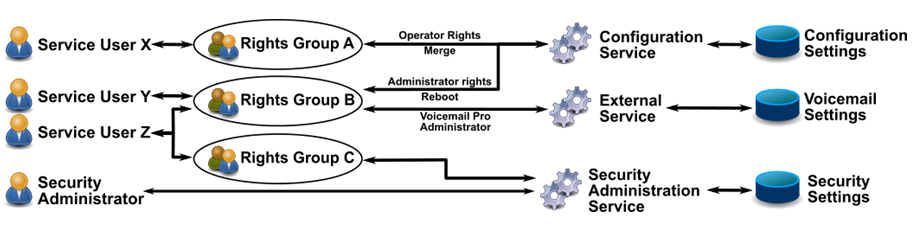
In the example above:
Service user X can read and write the configuration settings. However, they can only edit operator settings, and can only make changes that are mergeable.
Service user Y can read and write the configuration settings. They can edit all the configuration settings, including making changes that require an IP Office reboot. They can also access the settings of the Voicemail Pro service.
Service user Z has the same configuration access as service user Y. However, they can also view and edit the security settings.
The security administrator can only view and edit the security settings.