

AVAYA DOCUMENTATION CENTER
Find answers to your technical questions and learn how to use our products
Administering Avaya IP Office using Manager
Service Users, Roles, and Rights Groups
The IP Office controls access to its settings and services using Service Users and Rights Groups stored in its security settings.
Connecting to the IP Office requires entering a Service Users username and password.
The Rights Groups to which the Service Users belongs define the permissions that the service user has.
Feature |
Description |
|---|---|
Security Administrator |
The security administrator is a special user that differs from the service users. You can use their username and password to access and edit the security settings. However, the security administrator cannot access any other IP Office services. You cannot remove or disable this account. |
Service Users |
Each service user has a username, a password, and is a member of one or more Rights Groups. The IP Office supports up to 64 service users. |
Rights Groups |
The Rights Groups to which a service user belongs sets their permissions. For example:
When a service user is a member of more than one rights group, they combine the permissions of each rights group. The IP Office supports up to 32 rights groups. |
Example Rights Assignment
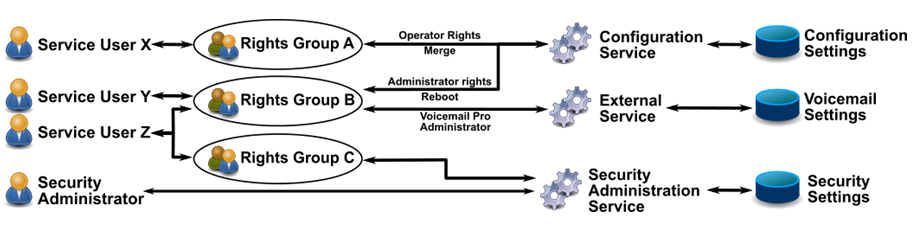
In the example above:
Service user X can read and write the configuration settings. However, they can only edit operator settings, and can only make changes that are mergeable.
Service user Y can read and write the configuration settings. They can edit all the configuration settings, including making changes that require an IP Office reboot. They can also access the settings of the Voicemail Pro service.
Service user Z has the same configuration access as service user Y. However, they can also view and edit the security settings.
The security administrator can only view and edit the security settings.
Changing Administrative Users and Rights Groups
You can use IP Office Manager and IP Office Web Manager to edit service users and rights groups. Before making any changes, you must consider the following:
IP Office in a multi-site network must have consistent service users and rights groups. IP Office Manager and IP Office Web Manager have synchronization tools to assist in achieving this.
All changes must follow security best practices. For example, following a password policy and only allowing minimal access rights.