

AVAYA DOCUMENTATION CENTER
Find answers to your technical questions and learn how to use our products
Administering Avaya IP Office using Manager
Remote Access
The system support remote access for incoming data calls on trunks.

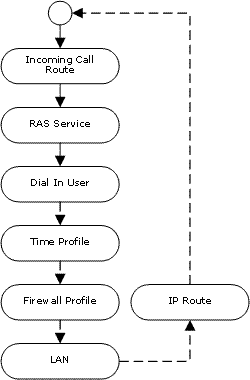
To do remote access, an incoming call is passed through the following elements of the system configuration.
 |
|
 Time Profile The user settings can specify a time profile. The time profile then controls when remote access is allowed.
  Firewall Profile The user settings can specify a firewall profile. The firewall profile then controls what traffic is allowed through the remote access connection.
 System | LAN The system can provide DHCP support for remote access connections when it is set to Server or Dial in modes. Alternatively the remote access client can use a static IP address on the system's subnet.
ISDN Remote Access Example
 Create a User The required details are:
In the User tab: Enter a Name and Password. The system is case sensitive. Remember to take care with passwords as this is a remote access link into your network.
In the Dial In tab: Ensure that Dial In On is ticked. The Firewall Profile and Time Profile are optional.
 Create a RAS Record
In the RAS tab: Enter the same name as the user that you created earlier. Again, remember this is case sensitive.
 Create an Incoming Call Route
Set the Bearer Capability to Any Data.
In the Destination drop-down list, select the RAS record created above.
The values that you enter for any of the other fields will depend on whether the remote user will be calling in on a particular line, number or from a set ICLID.
Is a Return IP Route Needed ? Go to Step 5.
 Create a IP Route (Optional) If the remote user has an IP address that is not in the same domain as the system, then an IP Route is needed for return data. This is not necessary if the remote user's dial-up connection method is set to 'Obtain an IP Address Automatically' and the system's DHCP mode is set to Server or Dial In.
Enter the IP Address and IP Mask of the remote system.
In the Destination drop-down list select the RAS record created above.
Analog Remote Access Example

Configuration for a connection from an analog modem call is very similar to the ISDN example. However the system must be able to answer modem calls. This can be done in the following ways:
Analog Trunk Modem Mode On systems with an analog trunk card in the control unit, the first analog trunk can be set to answer V.32 modem calls. This is done by checking the Modem Enabled option on the analog line settings or using the default short code *9000* to toggle this service on or off.
IP500 ATM4 Uni Trunk Card Modem Support It is not required to switch the card's modem port on/off. The trunk card's V32 modem function can be accessed simply by routing a modem call to the RAS service's extension number. The modem call does not have to use the first analog trunk, instead the port remains available for voice calls.
When using an analog modem, the Bearer Capability of the incoming call route used should be Any Voice.