

AVAYA DOCUMENTATION CENTER
Find answers to your technical questions and learn how to use our products
Administering Avaya IP Office with Web Manager
Bridged Appearance Example 3
In this example, a call is passed from the call appearance user to the bridged appearance user. Both users have Ringing Line Preference and Auto Hold on.
Bridged Appearance User 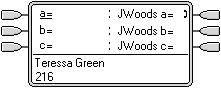 |
Call on Colleague's Phone The call appearance user has answered a call on one of their call appearances. The bridged appearance user's matching bridged appearance shows 'in use elsewhere'. |
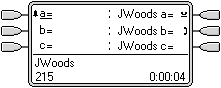 |
Call Held by Colleague The call appearance user has put the call on hold and called the bridged appearance user. The first bridged call appearance shows a call 'on hold elsewhere' whilst the second matches the call between users. |
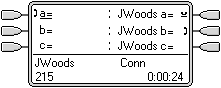 |
Enquiry Call Between Colleagues By going off hook, the bridged appearance user has answered the call from the call appearance user. They are asked to pickup the call on the colleagues first call appearance. |
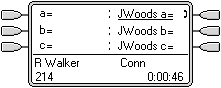 |
Call Taken Off Hold Pressing the first bridged appearance button takes that call off hold and connects it to the bridged appearance user. In this example, Auto Hold is not set for the system, so pressing the bridged appearance button disconnected the call from the colleague. If Auto Hold had been set, the colleague's call would have been put on hold until they hung up. |