

AVAYA DOCUMENTATION CENTER
Find answers to your technical questions and learn how to use our products
Administering Avaya IP Office with Web Manager
Delayed Ring Preference
When a call is alerting at an idle phone, by default Ringing Line Preference sets the call as the currently selected button and if the user then goes off-hook they will answer that call.
In most situations this is acceptable as the user hears ringing which informs them that there is a call waiting to be answered. If the user wants to make a call instead, they can press another call appearance button to go off-hook on that other button.
When ring delay is being used there can potentially be a problem if the user lifts the handset to make a call without looking at the display. If they do this while the a call is alerting silently on a button with ring delay, the user will actually answer the waiting call rather than get dial tone to make a call.
Once the call alerting on a button has currently selected call status, it retains that status even if a prior call on a button with ring delay applied comes out of its ring delay period.
Delayed Ring Preference Example 1
In this example the user has a line appearance button for a line they monitor. This line appearance button has been set to no ring as the user occasionally need to use that line but does not normally answer calls on that line.
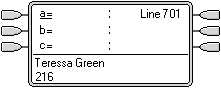 |
Phone Idle The phone is idle. The current selected button has been determined by Idle Line Preference as the first available call appearance button. This is shown by the _ underscore next to that button. |
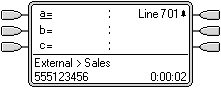 |
Incoming Call Alerting on the Line An incoming call arrives on the line and begin to alert somewhere on the system. The user's line appearance button shows this visually but doesn't ring audibly. Normally ringing line preference would make the line appearance the user's currently selected button and therefore they would answer the line if they went off-hook expecting to make a call. However, because Delayed Ring Preference is on for the user, ringing line preference is not applied and idle line preference makes their current selected button the first call appearance. If the user were to go off-hook they would be making a call on that call appearance. |
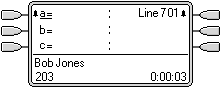 |
Call Alerting for the User A call for the user arrives. It alerts on the first available call appearance button. Ringing line preference is applied and makes that the users currently selected button. If the user goes off-hook now that will answer the call on the call appearance and not the line appearance. |
Delayed Ring Preference Example 2
This is similar to the previous example except that the user and the line has been configured for a 15 second ring delay. This informs the users that the line has not been answered for some reason and allows them to answer it by just going off-hook.
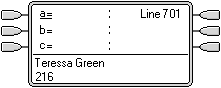 |
Phone Idle The phone is idle. The current selected button has been determined by Idle Line Preference as the first available call appearance button. This is shown by the _ underscore next to that button. |
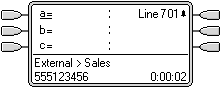 |
Incoming Call Alerting on the Line An incoming call arrives on the line and begin to alert somewhere on the system. The user's line appearance button shows this visually but doesn't ring audibly. Because Delayed Ring Preference is on for the user, ringing line preference is not applied and idle line preference makes their current selected button the first call appearance. If the user were to go off-hook they would be making a call on that call appearance. |
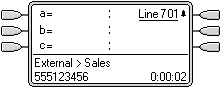 |
Call Continues Alerting When the ring delay for the line appearance expires, if no other call has taken ringing line preference it becomes the current selected call and will be answered if the user goes off-hook. |