

AVAYA DOCUMENTATION CENTER
Find answers to your technical questions and learn how to use our products
Administering Avaya IP Office with Web Manager
The Menu Bar and Solution Display
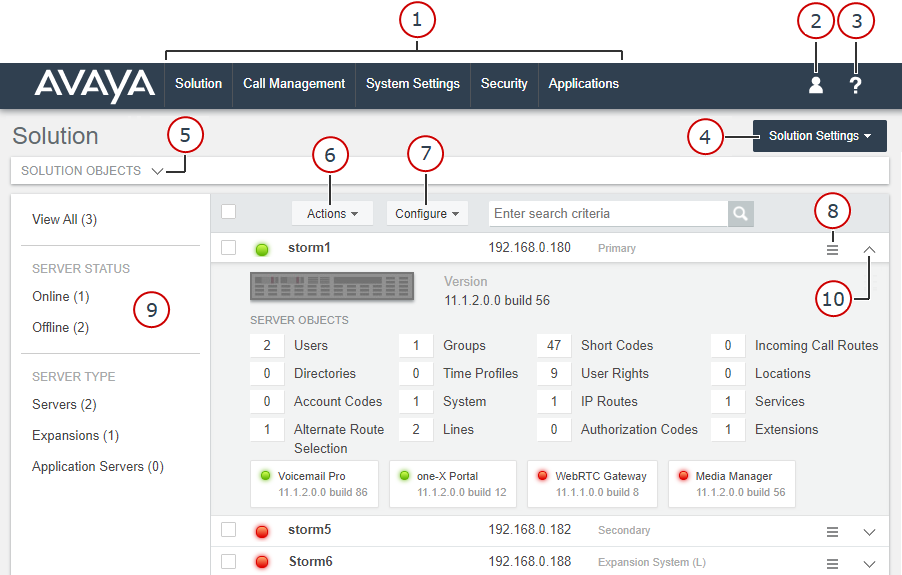
The screenshot below shows an example IP Office Server Edition network, as seen by accessing the web manager of the primary server. The web manager view differs for other types of IP Office server, but largely contains the same controls.
Item |
Description |
|---|---|
1. Menu Bar |
Use these options to navigate to various sub-menus. The menus vary depending on the type of IP Office system(s) being managed. See Menu Bar Options. |
2. User Preferences |
The
|
3. Help |
The help menu contains:
|
4. Solution Settings |
Provides options to support web manager operation. Not shown for IP500 V2 web manager. See Solution Button Menus. |
5. Solution Objects |
Only shown for IP Office Server Edition. Click Clicking on any (Users, Groups, Short Codes, Directories, Time Profiles, Locations, Account Codes and User Rights), displays a list of those items that can be used to add, edit or delete entries. |
6. Actions |
Provides a range of configuration actions to be performed on the server or in a network, selected servers. See Solution Button Menus. |
7. Configure |
Only shown for IP Office Server Edition. Provides options to add, remove and link the multiple servers in the Server Edition network. See Solution Button Menus. |
8. Server Settings |
The This option is not shown for IP500 V2 web manager. Instead use . |
9. Filter Panel |
Filter panels are shown on various screens in web manager. They can be used to show only matching entries. |
10. Server Details |
Use the |
 icon is used to access to access the following options:
 to a summary of the number of key configuration items.
 icon is used to access a range of server specific options. See