

AVAYA DOCUMENTATION CENTER
Find answers to your technical questions and learn how to use our products
Administering Avaya IP Office with Web Manager
Answer Pre-Select
On some phones, only the details of the call alerting or connected on the current selected button are shown. The details of calls alerting on other buttons are not shown or only shown briefly when they are first presented and are then replaced again by the details of the call on the current selected button.
By default, pressing any of the other alerting buttons will answer the call on that button. Answer pre-select allows a user to press alerting buttons other than the current selected button without actually answering them. Instead the button pressed becomes the current selected button and its call details are displayed.
Note that using answer pre-select with a currently connected call will still either hold or end that call in accordance with the system's Auto Hold setting.
Answer Pre-Select Example 1
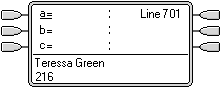 |
Phone Idle The phone is idle. The current selected button has been determined by Idle Line Preference as the first available idle call appearance button. This is shown by the _ underscore next to that button. |
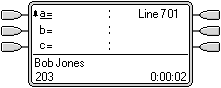 |
First Call Alerting A call for the user arrives. It alerts on the first available call appearance button. Ringing Line Preference uses this as the currently selected button as it is the only alerting call. |
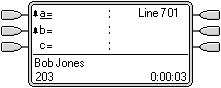 |
Second Call Alerting Another call for the user arrives. It alerts on the next available call appearance button. As the first call has been alerting longer, under Ringing Line Preference it retains the currently select button status. |
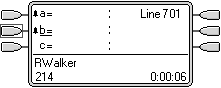 |
The User Presses the Second Call Appearance Pressing the second call appearance overrides ringing line preference and assigns current selected button status to the button without actually answering the call. The details of the caller are displayed. |
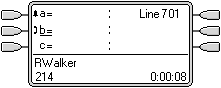 |
The User Answers the Call The user can press the button again to answer the call or just go off-hook to answer as it is now the currently selected button. |