

AVAYA DOCUMENTATION CENTER
Find answers to your technical questions and learn how to use our products
Administering Avaya IP Office with Web Manager
Idle Line Preference
Idle Line Preference determines the user's currently selected button as the first available idle call/line appearance button. Selected button indication is applied to that button and if the user goes off-hook, for example by lifting their handset, an outgoing call is started on that button.
?Why Would I Use Just Idle Line Preference In environments that are focused on making outgoing calls, for example telemarketing, incoming calls are infrequent and user's go off-hook expecting to make a call. Using Idle Line Preference without Ringing Line Preference ensures that the user doesn't inadvertently answer a call when expecting to make a call.
If all the available call/line appearance buttons are in use, no current selected button choice is made by Idle Line Preference. In this case, going off hook will have no effect.
For appearance button users with Idle Line Preference off, going off-hook (lifting the handset or pressing SPEAKER, HEADSET, etc) will have no effect until an appearance button is pressed.
By default Idle Line Preference is on for all users.
Idle Line Preference is overridden by Ringing Line Preference if also on for the user.
Idle Line Preference Example 1
In this example, only Idle Line Preference has been programmed for the user. Ringing Line Preference has not been programmed.
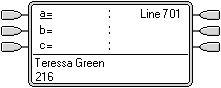 |
Phone Idle The phone is idle. The current selected button determined by Idle Line Preference is the first available idle call appearance button. This is shown by the _ underscore of the button text. |
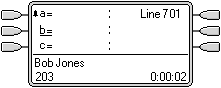 |
First Call to User A call for the user arrives. It alerts on the first available call appearance button. Idle Line Preference has changed the current selected button to the next available idle call appearance. |
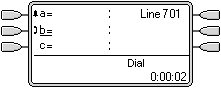 |
User Goes Off Hook
|
Idle Line Preference Example 2
In this example, only Idle Line Preference has been programmed for the user. Ringing Line Preference has not been not programmed.
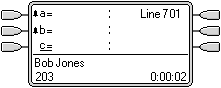 |
Two Calls Alerting The users has two incoming calls alerting. Idle Line Preference has set the currently selected button to their third call appearance. |
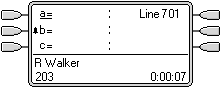 |
First Caller Abandons If the first incoming caller disconnects, the currently selected button changes to the first call appearance as this is now the first available idle call appearance button. |
Idle Line Preference Example 3
In this example, both Idle Line Preference and Ringing Line Preference are set for the user.
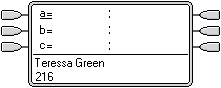 |
Phone Idle The phone is idle and Idle Line Preference has assigned current selected button to the first call appearance. |
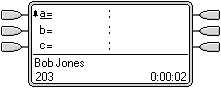 |
Call Alerting A call has arrived and Ringing Line Preference keeps the current selected button at the first call appearance. |
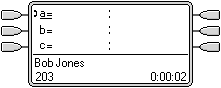 |
Call Answered With the call answered it retains current selected button status. |
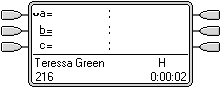 |
Call Held When the call is put on hold, Idle Line Preference assigns current selected button status to the next available call appearance button. |
Idle Line Preference Example 4
In this example, only Idle Line Preference has been programmed for the user. Ringing Line Preference has not been programmed.
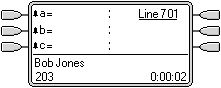 |
All Call Appearances Alerting In this case, all the users call appearance buttons are alerting incoming calls. Idle Line Preference has changed the currently selected button to the first available line appearance. |