

AVAYA DOCUMENTATION CENTER
Find answers to your technical questions and learn how to use our products
Administering Avaya Aura® Communication Manager
Personal Computer Interface
The personal computer (PC) Interface consists of the Personal Computer/PBX platforms and Personal Computer/ISDN Platform product family. These products are used with Communication Manager to provide users of IBM-compatible Personal Computers fully-integrated voice and data workstation capabilities.
Two groups of different configurations are available for Personal Computer Interface: group 1 uses DCP and group 2 uses the ISDN-BRI (Basic Rate Interface) protocol.
The group 1 configurations consist of DCP configurations that use a DCP expansion card in the PC to link to the Avaya Server. Group 1 (shown in DCP PC interface configuration (Group 1)) uses the following connections:
The Personal Computer Interface card plugs into an expansion slot on the Personal Computer. The card has 2 standard 8-pin modular jacks (line and telephone).
The digital telephone plugs into the telephone jack on the Personal Computer Interface card.
The line jack on the card provides a digital port connection to Avaya servers.
The distance between the Personal Computer Interface card and the PBX should be no more than 1524m for 24-gauge wire or 1219m for 26-gauge wire.
Figure : 1. DCP Personal Computer interface configuration (Group 1) 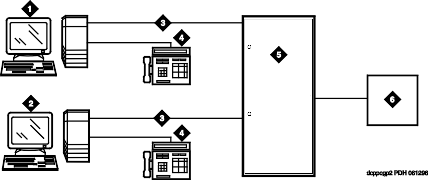
Table 1: Figure notes: IBM-compatible Personal Computer with DCP Interface card
IBM-compatible Personal Computer with DCP Interface card
DCP
DCP telephone
Avaya (Digital Line, Digital Line (16-DCP-2-Wire), or Digital Line (24-DCP-2-wire) circuit pack)
Host
The group 2 configurations link to the server using a Personal Computer/ISDN Interface card installed in the Personal Computer. This group can include a stand-alone Personal Computer terminal, or up to 4 telephones, handsets, or headsets. Group 2 (shown in the figure) uses Personal Computer/ISDN Interface cards (up to four cards) which plug into expansion slots on the Personal Computer. These cards each provide 2 standard 8-pin modular-jack connections for both line connections (to the Avaya Server) and telephone connections. A standard 4-pin modular jack is also available for use with a handset or headset.
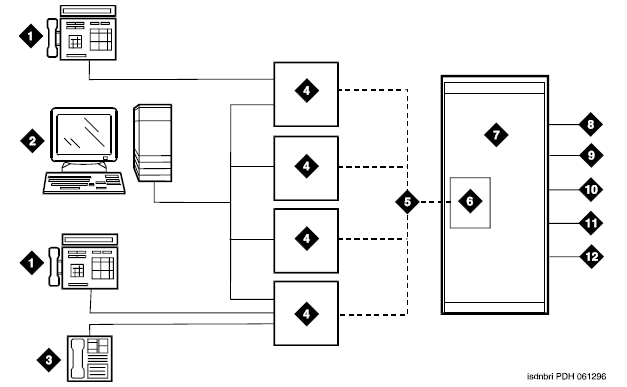
|
Personal Computer Interface users have multiple appearances (depending on the software application used) for their assigned extension. Designate one or more of these appearances for use with data calls. With the ISDN-BRI version, you can use up to 4 separate Personal Computer/ISDN Interface cards on the same Personal Computer. Assign each card a separate extension, and assign each extension one or more appearances. The availability of specific features depends on the COS of the extension and the COS for Communication Manager. Modem Pooling is provided to ensure general availability of off-net data-calling services.