

AVAYA DOCUMENTATION CENTER
Find answers to your technical questions and learn how to use our products
Administering Avaya Oceana®
Channel Interruptibility
To configure Channel Interruptibility, all channels must have minimum one check box selected where the corresponding value for the row and column intersect as shown in the following figure. You can avoid the blank rows.
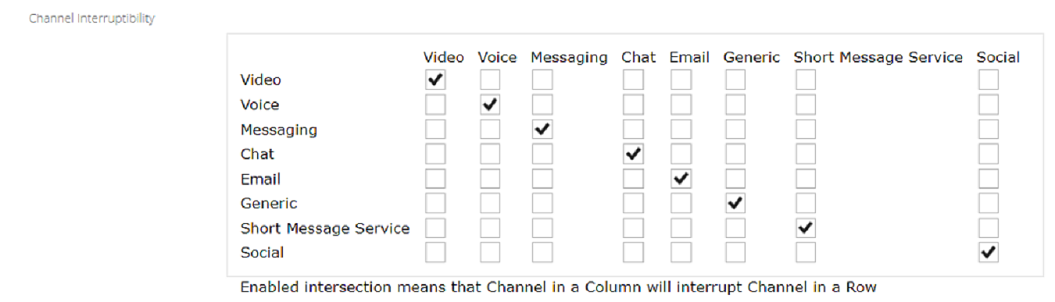
The Channel interruptibility feature has built-in default behavior designed to prevent misconfiguration of the interruptibility matrix. If a channel has no check box selected in the corresponding row in the matrix, the channel is interruptible by itself and any other channels the user is logged in on. This setting prevents an agent getting locked or stuck on a single channel.
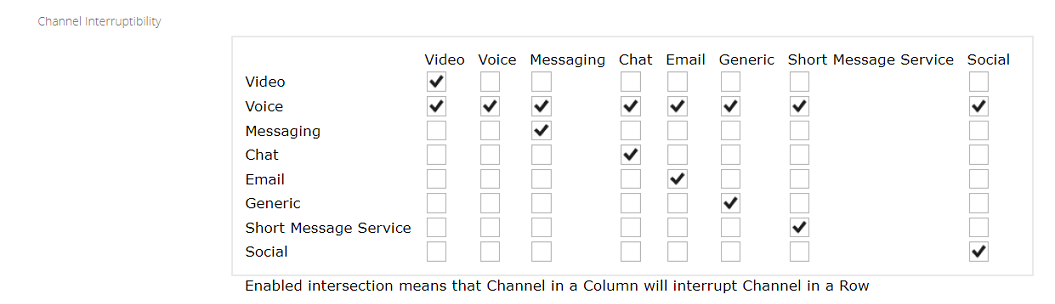
For example, in a configuration where voice must be interruptible by itself and all other channels, configure the matrix as follows:
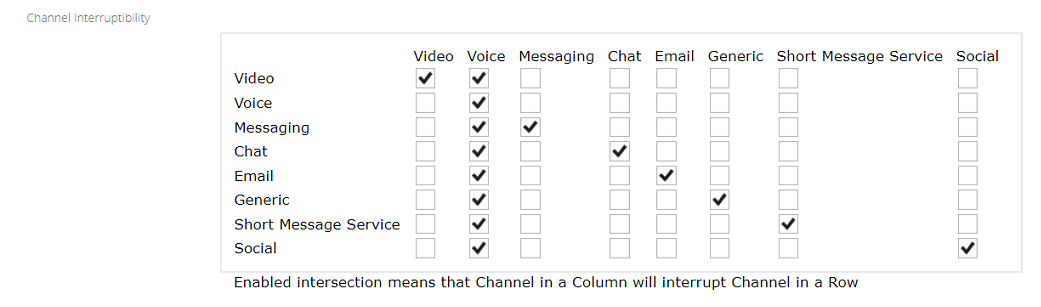
For example, in a configuration where voice must not be interruptible by any other channels, but it can interrupt any other channel, configure the matrix as follows:
To turn off interruptibility, do one of the following:
Select all check boxes on all channels.
Select no check boxes on any channel.
Note:
When Administrator will create new Matrix, all diagonal elements is set to default. It is recommended to avoid the blank rows.