

AVAYA DOCUMENTATION CENTER
Find answers to your technical questions and learn how to use our products
Administering Avaya Proactive Outreach Manager
Restrictions
Restrictions node is a parent node for Restrict, Custom Restrict, and Override nodes.
The following table lists the properties of the node and their descriptions:
Property Name |
Description |
|---|---|
Name |
Type a display name for the Restrictions node. If you do not specify a name, the default name is Restrictions. |
Description |
Type a description for the Restrictions node |
Edit Description |
Click to edit the description. |
Note:
All restrictions specified in the campaign strategy are processed from top to bottom in the order they are listed, except for the DNC, which is applied first before any other restriction. If two more restrictions match, although they have different exceptions, the system applies the last restriction.
Sample case study — Appointment reminder
Swedish clinics chose Premiere Global's Appointment Reminders application to send automated voice reminders to their patients of their upcoming appointments.
All 50 clinics in the network operate under one central appointment reservation system called MYSIS. Two business days before the scheduled appointment date, a file is exported for each clinic containing the patient name, phone number, appointment date, time, and location. The FTP submission is sent into the system which builds the job based on the profile setting and queues it up for delivery. The system then uses Text-to-Speech to deliver the message while inserting the appropriate appointment details. The message also uses Data Collection allowing the patients to press 1 to request a call to reschedule and press 2 to cancel the appointment.
Each delivery report is sent directly to the Clinic Administrator who can take appropriate action on the non-deliveries, cancels, or reschedules.
You can design the reminder in two ways:
Use Record Selection criteria in filter template: Use to filter only those records whose appointment date is after 2 days. This is an efficient way to create the appointment reminder as the campaign runs with filtered records and hence requires less resources. Use the attribute date and name it as appointment_date to store the appointment date. Specify the Filter Criteria as all records whose appointment_date is equal to $TODAY+2, that is, 2 days after the current date.
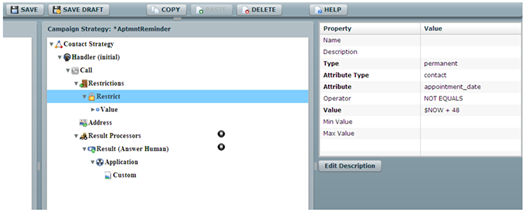
Use Restrictions in the campaign strategy: Use to restrict all contacts whose appointment_date is NOT EQUAL to $NOW + 48. Use $NOW to specify the current date and time. In this case when the system compares the date type attribute, the system compares the value with the system’s current date. In this case, to apply an offset, that is, increment to $NOW, specify the offset value in hours. To specify 2 days after the current date, the offset is 48 hours.
Sample case study — Furniture delivery schedule reminder
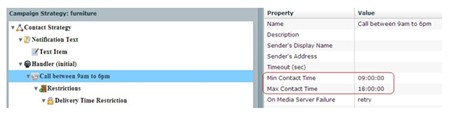
ABC works, a furniture delivery company wants to call the customers about the furniture delivery schedule. The company provides the time value and they expect the system to call 3 hours ahead of the time value the company provides. For example, if the delivery is scheduled for 3:00 pm on Friday, May 25, 2012, then the company expects the system to call the customer at 12:00 noon, or as close to 12:00 noon as possible. The company wants to follow some time restrictions while making such calls. All calls must be made between 9 am and 6 pm. If the delivery is scheduled for 9 am, the system cannot make the call at 6 am.
As the POM system can make calls only between 9 am to 6 pm, set the Min Contact Time and Max Contact Time in the Call node of the campaign strategy.
Important:
Use $NOW to specify the current date, time, or timestamp. You can use $NOW with attributes having datatype as date, time, or timestamp. For this case study, you use time datatype. The attribute sch_time is of the datatype time and stores the delivery time of each record.
You can use offsets with $NOW that is increment or decrement the value with respect to $NOW. For example, $NOW+3 when compared with time or timestamp data type, represents current time + 3 hours. Similarly, $NOW+72 when compared with current time represents current time+72 hours, but when compared with current date, represents current date+3 days. $NOW+3.25 when compared with timestamp represents current time + 3 hours 15 minutes.
Applying restrictions for the furniture delivery schedule case study
There are 2 schedules that you handle for the furniture delivery schedule:
Elapsed schedules
Schedules which are more than 3 hours away
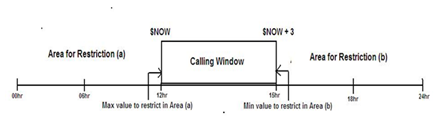
The Calling window shifts with $NOW values, that is, if $NOW=12:00 pm, then the system does not place a call for a delivery schedule at 4:00 pm as the calling window is only 3 hours. The system places a call to the same contact after 1:00 pm. For such contact records, you must mark the records as temporary restricted.
Restrict all schedules which are less than $NOW or the system must not call until 12:00 hours. So the Max Contact Time value for the restriction area (a) is $NOW.
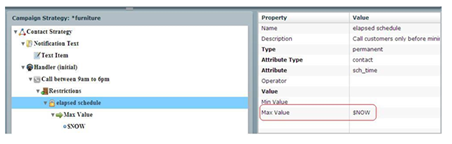
For the restriction area (a), specify the Type as permanent. This marks the record restricted and the system does not retry this record. All the records whose delivery time is elapsed are not required to be called during the campaign.
Restrict all schedules which are greater than $NOW+3 or the system must not call beyond 3:00 hours. So the Min Contact Time value for the restriction area (b) is $NOW + 3.
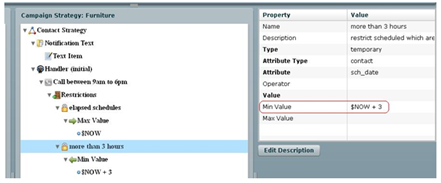
For the restriction area (a), specify the Type as temporary. This marks the record as restricted and the system retries to check if the restriction is still valid for the records. After the restriction condition is no longer applicable for the record, POM places a call to the record.