

AVAYA DOCUMENTATION CENTER
Find answers to your technical questions and learn how to use our products
Administering IP Office Voicemail Pro
Centralized Voicemail
Within a Small Community Network, a single Voicemail Pro server can be used to provide voicemail features for all the IP Office in the SCN.
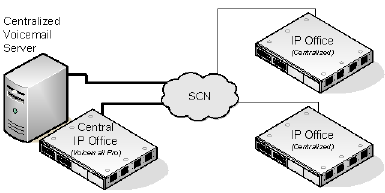
One IP Office is configured for operation with the Voicemail Pro server as normal, including the license for voicemail operation and the features required. This IP Office is then regarded as the central IP Office for voicemail.
Within the other IP Office systems, the voicemail settings are configured to indicate that they get their voicemail services from the central IP Office. These IP Office systems do not need licenses for voicemail (except for UMS if required).
The users of the IP Office systems located in different time zones receive messages with their respective time zone's time stamp.
In the centralized Voicemail Pro setup, the time source of the IP Office network must be SNTP (Simple Network Time Protocol).
Summary of IP Office Settings
Once the IP Office SCN has been setup, the following settings are used in the IP Office systems to provide voicemail operation for all the IP Office systems.
IP Office Settings |
Central IP Office |
Other IP Office systems |
|---|---|---|
Voicemail Type |
Voicemail Pro |
Centralized Voicemail |
Voicemail IP Address |
Set to the Voicemail Pro server computer's IP address. |
Not used. |
Voicemail Destination |
Not used. |
Set to the Outgoing Group ID of the H323 Line to the central IP Office. |
Licenses |
This system needs licenses for all the Voicemail Pro features required. |
The other IP Office systems only require licenses for UMS and or for Media Manager if required. |
When accessing a Voicemail Pro server that is acting as centralized Voicemail Pro server, the Voicemail Pro client displays Centralized Voicemail in the title bar.