

AVAYA DOCUMENTATION CENTER
Find answers to your technical questions and learn how to use our products
Administering IP Office Voicemail Pro
Customer menu
After completing the sequence of questions and responses, the caller can be offered a menu of options. The Customer Menu window of the Campaign Wizard is used to select the options available.
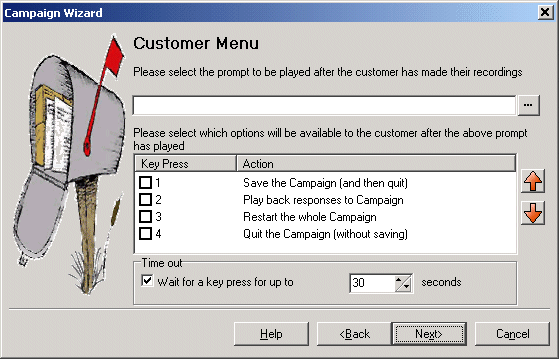
Please select the prompt to be played after the customer has made their recordings: You can select or create a prompt that is then played to callers after completing the sequence of questions and answers. The prompt should inform the customer of which actions selected from the list they can use. Click to specify which prompt to play or create a new prompt in the Wave Editor window. See Using the Wave Editor .
Please select which options will be available to the customer after the above prompt has played: Check the boxes to select the options that will be available to the customer. The customer then needs to press the corresponding key.
Save the Campaign (and then quit): Saves caller responses and then disconnects the caller.
Play back response to the Campaign: Plays back the customers responses to them and then repeats this customer menu.
Restart the whole Campaign: Deletes the customer responses and restarts the sequence of questions and answers.
Quit the Campaign (without saving): Disconnects the customer without saving their responses.
Move options: You can move the currently highlighted option so that the key presses associated with the options differ
Timeout: Sets how long the voicemail server should wait for an answer before following the No Answer connection.