

AVAYA DOCUMENTATION CENTER
Find answers to your technical questions and learn how to use our products
Administering IP Office Voicemail Pro
Get Mail Action
The Get Mail action accesses the messages in the caller's mailbox or a specified mailbox. The caller then has access to the standard mailbox features setup for that mailbox. If the extension is a trusted extension, the user does not have to enter the mailbox number and code. See Creating a Trusted Location.
Procedure
- Click the
 Mailbox Actions icon.
 - Select
 Get Mail.
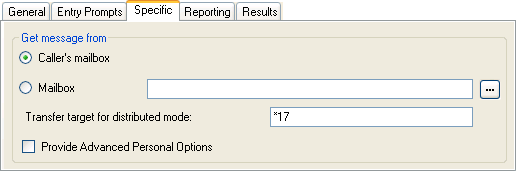
 - Select the Specific tab. Set the options as required.
Setting
Description
Caller's Mailbox
If selected, the mailbox matching the start point of the call is used.
Mailbox
Select or enter the name of the target mailbox. If ? is entered, voicemail will prompt callers to enter the mailbox number required.
Clicking on the … browse button allows selection of the target mailbox from a drop-down list of either Start point or module, System defined variables or Mailbox. The options vary depending on the action and field.
Transfer target for distributed mode
Default = *17.
This option is required for Get Mail actions on voicemail servers acting as a distributed server. The value should match a default voicemail collect short code (telephone number ?U) set within the IP Office configuration.
Provide Advanced Personal Options
Default = Off. Intuity mode only.:
If selected, the user is able to access a number of additional options within the mailbox telephone user interface.
Result
The action can have the following result which can then be connected to further actions:
Next: This conditions when this option is used depend on the mailbox mode in which the Voicemail Pro is running:
IP Office mode: Users who press 0 while they are logged into their mailboxes will be routed to the Next result.
Intuity mode: Users who press *0 whilst in their mailboxes will be routed to their Voicemail Reception number, if set. The Next result is not used.
Example
For examples of the action being used in a call flow, see: