

AVAYA DOCUMENTATION CENTER
Find answers to your technical questions and learn how to use our products
Administering IP Office Voicemail Pro
The Start Action
This action is present at the start of all call flows. It is simply the start point to which other actions can be linked.
While this action has General, Entry Prompts, Reporting and Results tabs they should not be used. Any settings added to those tabs will be ignored and should be applied through the tabs of the first additional action added to the call flow and linked to the Start action.
Procedure
Double-click on the  Start icon and select the Specific tab (the other tabs should not be used).
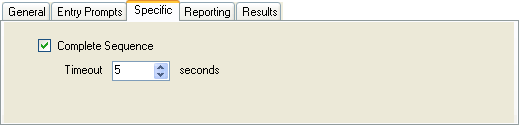
Start icon and select the Specific tab (the other tabs should not be used).
Setting |
Description |
|---|---|
Complete Sequence |
When selected, if the caller hangs up during the call flow, the call flow will continue running. If the current action which the call has reached in the call flow has a timeout result, that result connection is followed immediately. The call flow will continue until it either reaches a Disconnect action, a result with no action or the Timeout specified below. |
Timeout |
Default = 5 seconds. Range 0 to 120 seconds. This timeout sets the maximum time the call flow should continue running if Complete Sequence is selected. |
Example
In the call flow below, a Listen action is used to record a message and then two following eMail actions are used to distribute copies of the message.

Without Complete Sequence enabled in the Start, if the caller hangs up after the recording no e-mails are sent.
With the Complete Sequence option enabled in the Start, the e-mails are sent regardless of the caller hanging up.