

AVAYA DOCUMENTATION CENTER
Find answers to your technical questions and learn how to use our products
Administering IP Office Voicemail Pro
'Backup & Restore' System Preferences
This tab can be to make, schedule and restore backups of the voicemail server. These are legacy functions used mainly with old Windows-based voicemail servers (see Client Backup and Restore).
For current voicemail servers, it is recommended that the backup and restore functions available through the server's web management menus are used instead (see Backup and restore using Web Manager).
Setting |
Description |
|---|---|
Data Backup |
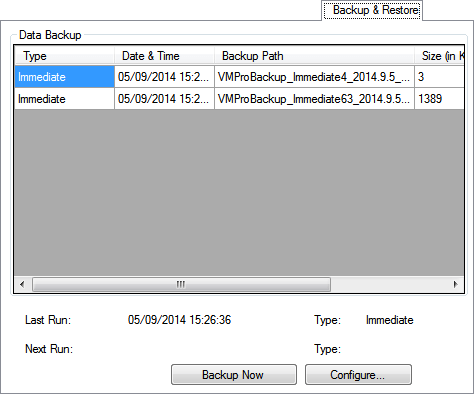
The Data Backup section displays details of the previous backups. The list only includes those backups that are saved on the computer running the client. To refresh the list, close the System Preferences dialog box and open the dialog box again. |
Last Run/Type |
The time and type of the previous backup. |
Next Run/Type |
The time and type of the backup that is scheduled to run next. If a backup is already in progress, the Next Run field displays Active. |
Restore |
Click to restore the voicemail data and settings from a backup. See Client Backup and Restore. |
Backup Now |
Take an immediate backup of the voicemail data and settings. |
Abort |
If a backup is already in progress, click to abandon the backup in progress. |
Configure |
Click to schedule backups for the voicemail data and settings. |