

AVAYA DOCUMENTATION CENTER
Find answers to your technical questions and learn how to use our products
Administering IP Office Voicemail Pro
Adding a compare element
About this task
The Compare element  is used to add a variable that will be used to determine the call flow to be presented to the caller. You can compare Voicemail Pro call variables , for example
 $POS or $ETA, against each other or against a value you enter.
Procedure
- Click the
 Element List icon in the toolbar.
 - Click Compare.
- Double-click on the element to view its settings.
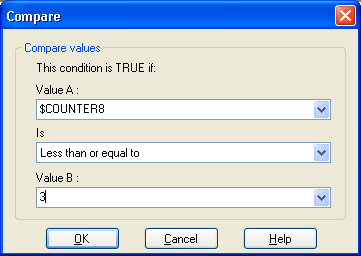
Value A: Enter a value or use the drop down to select a call variable .
Is: Select the criteria which should be used to determine whether the element is currently 'true' or 'false'. Options are:
Equal to: True if value A equals values B (A = B).
Not equal to: True if value A does not equal value B (A =! B).
Less than: True if value A is less than value B (A < B).
Greater than: True if value A is greater than value B (A > B).
Less than or equal to: True if value A is less or equal to value B (A <= B).
Greater than or equal to: True if value A is greater than or equal to value B (A >= B).
Value B: Enter a value or use the drop down to select a call variable .