

AVAYA DOCUMENTATION CENTER
Find answers to your technical questions and learn how to use our products
Administering IP Office Voicemail Pro
UMS IMAP
Most e-mail clients that support IMAP display IMAP messages in a separate folder. The contents of that folder are synchronized when the folder is viewed.
Note:
The type of icons used and whether different icons are supported for different message statuses depends on the e-mail client used. The notes below are for Outlook and Outlook Express.
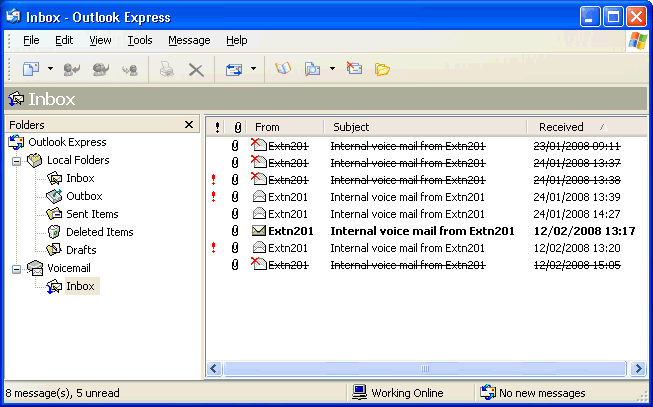
The following should be noted about the IMAP folder view:
New messages are presented as a closed envelope.
Read messages are presented as an open envelope.
Priority messages are indicated as such.
Private messages are not indicated as such. However the message may be indicated as confidential when opened.
Saved messages are not indicated as such.
Deleted messages are indicated as deleted but remain visible.
The voicemail server does not actually delete messages until at least 24 hours after it was marked as deleted.
Deleted messages are no longer accessible through the voicemail telephone prompts interface or Visual Voice.
Deleted messages can be undeleted. Those messages are then available through all the mailbox interfaces.
Moving a message in the IMAP folder to another folder in the E-mail client will cause the e-mail to be copied to the new folder and the original message is shown as deleted in the IMAP folder.
The Voicemail Prohousekeeping settings for automatic deletion of different message types (New, Read and Saved) are still applied.
IMAP cannot be used to send or forward messages to other voicemail mailboxes.