

AVAYA DOCUMENTATION CENTER
Find answers to your technical questions and learn how to use our products
Administering IP Office Voicemail Pro
Generic: String Manipulation
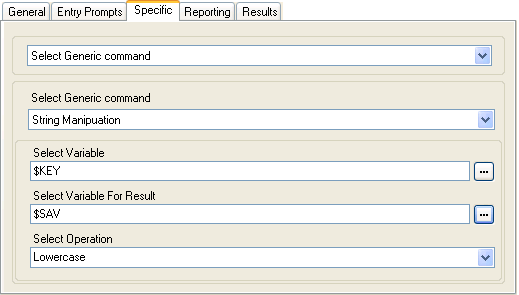
This Generic command assists you in editing a call variable in various ways. For example, take the full CLI of a call (for example 01555364200) and save just the area code part (in the example 555) as a new value. The action treats variable values as text strings, it does not differ whether the value is numeric or alphabetic.
For numeric variables value, the value can also be manipulated using the Arithmetic Evaluation. See Generic: Arithmetic Evaluation.
Setting |
Description |
|---|---|
Select Variable |
Enter the call variable on which the action should perform an operation. |
Select Variable For Result |
Enter the call variable which should be used to store the result of the operation. |
Select Operation |
Select the operation to be performed on the selected input. For examples, see Generic Action: String Manipulation Operations and Examples. Depending on the selected operation, the additional fields below are displayed. |
Number of Characters |
Sets the number of characters to be returned. |
From Position Index |
Sets the start character position for set of characters to be returned. |
From |
The values set which part of the input variable should be used for the result. The options To First Occurrence of, From First Occurrence of, To Last Occurrence of and From Last Occurrence of are used with the Char/String field specifying the occurrence to match. If no match occurs then the full string is used, the same as if From is set to all. |
Char/String |
This option sets the character or character string match that should be used as the start or end point for the operation. |
Free Format Command: String Manipulation
Using a Generic action, you can make voicemail perform an Arithmetic Evaluation action as a free format command.
For example,
EVAL:$CP0=$CP1+$CP2+5adds the current values of$CP1,$CP2plus 5 and stores the result as$CP0.For further examples, see Generic Action: String Manipulation Operations and Examples.