

AVAYA DOCUMENTATION CENTER
Find answers to your technical questions and learn how to use our products
Administering IP Office Voicemail Pro
Call Flow Start Points
Voicemail Pro The voicemail call flow configuration consists of a number of start points. When the voicemail server receives a call, it looks for a matching start point. When it finds one, the call then follows the series of actions that have been linked to that start point. If no match is found, then it provides standard voicemail functions to the call.
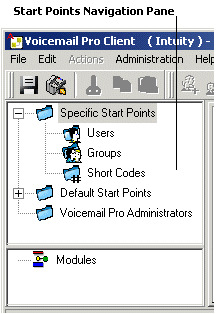
The Navigation pane contains an expandable and collapsible list of start points. These can be start points for individual users, hunt groups, short codes and default start points.
Specific Start Points
 : This folder contains the start points for users, groups and short codes.
Users
 : This folder contains start points set up for individual users. When selected a list is shown in the details pane containing the mailbox owners names and the names of any call flows that have been assigned to the selected mailbox.
 This is a user who has one or more start points configured. It can be expanded to show the different start points.
Collect
 : Used when the user rings voicemail.
Leave
: Used for calls to the user that are redirected to voicemail.Callback
: Used when voicemail rings a user to inform them of messages in the user's mailbox. See Setting up Voicemail Pro Callback.Queued & Still Queued
: Used when calls to the user are queued. See Personal Announcements.
Groups
 : This folder contains start points set up for hunt groups. When selected a list is shown in the details pane containing the mailbox owners names and the names of any call flows that have been assigned to the selected mailbox.
 This is a group that has one or more start points configured. It can be expanded to show the different start points.
Collect
: Used when someone accesses the group's mailbox.Leave
: Used when calls to the hunt group are redirected to voicemail.Queued & Still Queued
: Used when calls to the group are queued. See Customizing a Hunt Group Call Flow.
Short Codes
 : This folder contains any start points set up for particular short codes. Short code start points require the Telephone Number entry of the matching short code in the IP Office Manager to be set up in a particular way. For example, if a Start Point for short code *88 is set up, the settings for short code *88 in the IP Office Manager application must be as follows:
Short Code: *88
Telephone Number: *88
Feature - Voicemail Node: In the above set up, the internal callers can access the start point. To allow external callers access, set up an Incoming Call Route with the destination *88.
An individual short code on the IP Office. This requires a matching special short code to be set up in Manager.
Default Start Points
: Rather than set up individual start points for every user and group, you can also program actions against the default start points. These will then be used for all calls received by the Voicemail Pro server that don't match a specific start point. See Default start points.Voicemail Pro Administrators
: When the Voicemail Pro Administrators folder is selected a list is displayed in the details pane. The list contains the name, type and status of the administrators. Details can be added, amended or deleted.Server Queues
: Use this option to view a listing of range settings.User Variables
Alarms
Outcalls
Modules
 : Modules are reusable sets of actions. Use modules to create a sequence of actions that you can then use within any other start point's call flow. Any changes to the module will affect all the start points using that module. This simplifies the programming of actions if a number of start points use the same sequence of actions. Using modules also reduces the size of the call flow.