

AVAYA DOCUMENTATION CENTER
Find answers to your technical questions and learn how to use our products
Administering IP Office Voicemail Pro
International time zone support
The International Time Zone (ITZ) support is available on the Central voicemail server, and the Distributed voicemail servers that are connected to the IP Office located in different time zones across the globe. With the International Time Zone support enabled on the Central voicemail server, users of IP Office located across the globe receive messages in their voicemail system with their respective local timestamp.
Note:
UTC (Coordinated Universal Time) is the time standard that regulates world clocks and time. Computer servers, online services, and other entities that rely on having a universally accepted time use UTC.
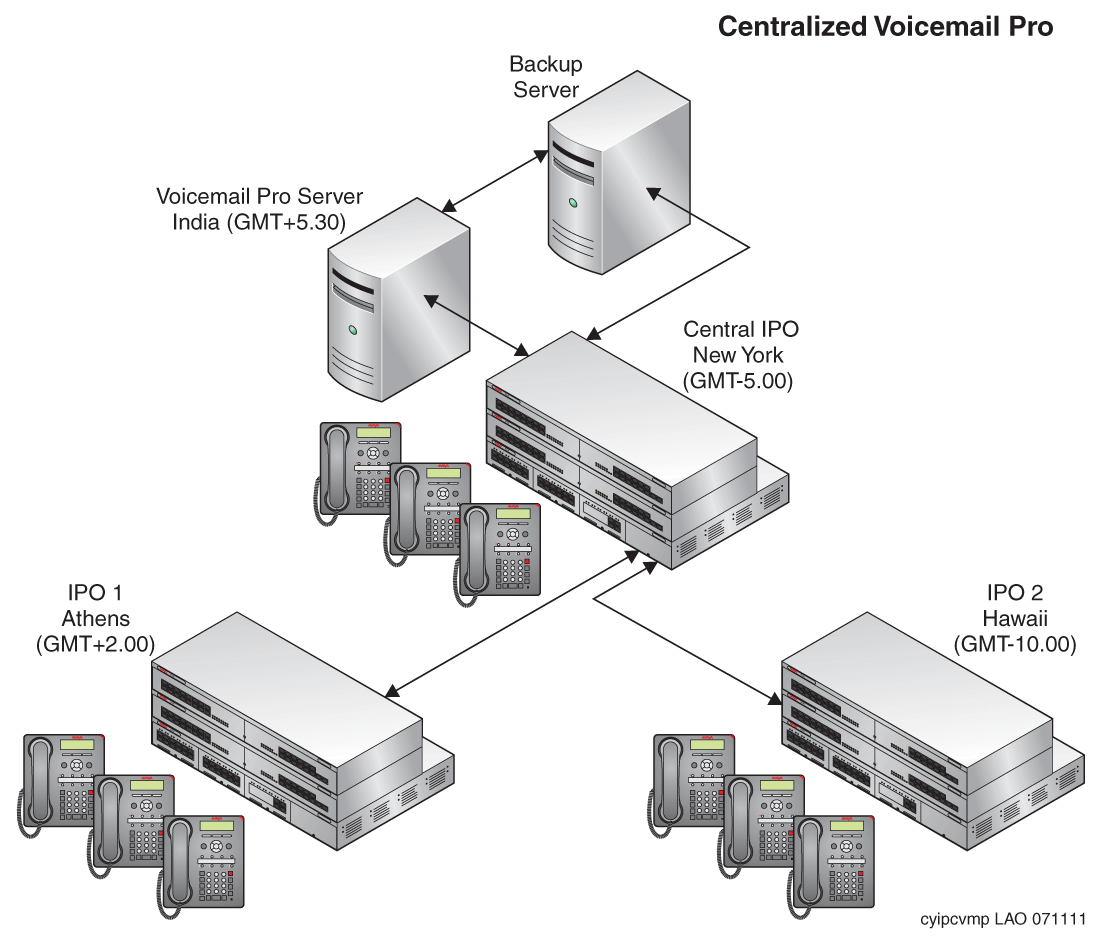
Example Centralized Voicemail Pro Setup
Sample scenario: Three IP Office, located in different time zones, connect to each other. Two of the IP Office, located in different geographical locations, connect to the central IP Office. The voicemail server connects to the central IP Office. The system stores the voicemail messages on the Centralized Voicemail Pro. Each IP Office is set up to use Simple Network Time Protocol (SNTP) or "None" as a time source.
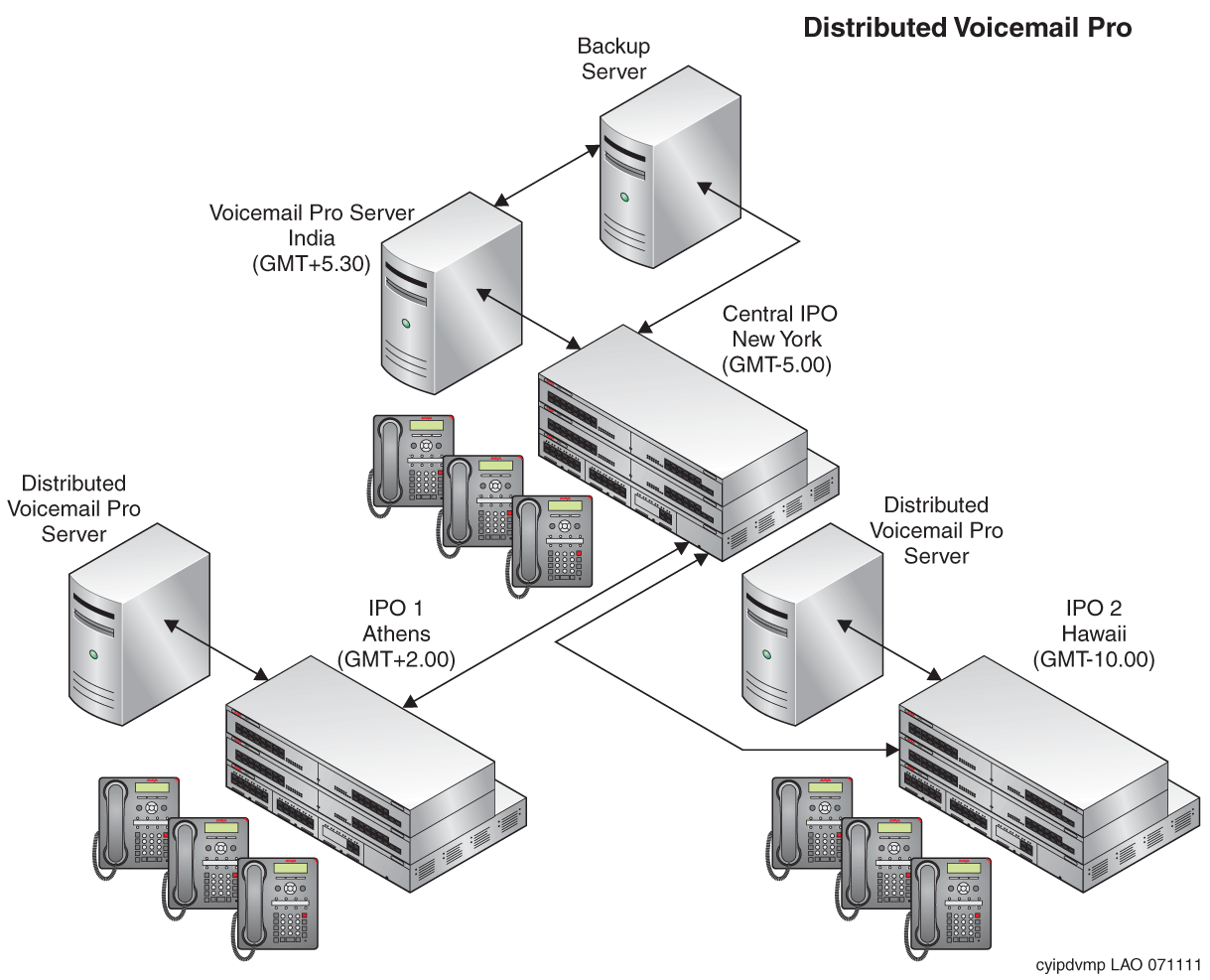
Example Distributed Voicemail Pro Setup
Sample scenario: Three IP Office, located in different time zones, connect to each other. Two of the IP Office, located in different geographical locations, connect to the central IP Office. The central IP Office connects to a central voicemail server and the other IP Office connect to the Distributed voicemail servers. Each IP Office is set up to use SNTP or "None" as a time source.
International Time Zone Scenarios
The various scenarios in which the International Time Zone support capability functions work on the voicemail servers are:
Scenario |
Description |
|---|---|
Call Answering: |
When you call a user located in a different time zone and leave a message in the mail box of the user, the system calculates the time stamp associated with the call answering using the UTC time and the local offset time of the IPO where the user receiving the message is located.
|
Clock Action |
When you invoke a Clock Action configured on a voicemail server, the Clock Action reports the time based on the time zone where you are located and not the time where the voicemail server is located.
|
Call Recording |
The system calculates the time stamp associated with the call recording using the UTC time and the local offset time of the IPO where the recording was initiated.
|
Campaign Recordings |
When you record a campaign, the system calculates the time stamp associated with a campaign recorded response using the UTC time and the local offset time of the IPO where the campaign response was recorded.
|
Week Planner Condition |
When you design a call flow and store it on the Centralized Voicemail Pro that contains a Week Planner Condition set for a particular time, the system checks the Week Planner Condition based on the time zone in which you are located and not based on the time where the Centralized Voicemail Pro is located.
|
Hunt Groups |
When you leave a message in a Hunt Group mailbox, the system calculates the time stamp associated with the call answering using the UTC time and the local offset time of the IPO where the Hunt Group receiving the message is located. Irrespective of the offset time set on the IP Office switches, where the users of that Hunt group are located, the time stamp associated with the messages in the Hunt Group is always based on the offset time set on the IP Office to which the Hunt Group belongs.
|
Distribution List |
When you send a message through a distribution list, the time stamp associated with the recording in the mailbox of each of the recipient is the UTC and the local time offset of the IP Office to which the recipient belongs.
|
Outcalling |
You can configure your mailbox such that when you receive a new message, the system generates a call on a pre-configured destination. The destination can be your desk number or an external number—telephone or mobile. For detailed information on configuration, see Setting the Outcalling System Preferences. The voicemail server checks the configured time spans against the local time of the user (UTC + local time offset). When you receive a new message in your mailbox, Voicemail Pro uses the local time, which is the UTC time and the offset time of the user, to compare with the configured outcalling time. The comparison between the local time and the outcalling time determines the destination of the outcalling.
|
Alarm Set |
You can configure Voicemail Pro to match the alarm time with the time zone where you are located. When you set an alarm on your telephone, Voicemail Pro automatically matches the alarm time with the local time of the user.
|
E-mail reading |
When you use Voicemail Pro TTS to read e-mails, the system calculates the time stamp associated with an e-mail using the UTC time and the local offset time of the IPO to which the recipient belongs.
|