AVAYA DOCUMENTATION CENTER
Find answers to your technical questions and learn how to use our products
Administering IP Office Voicemail Pro
Adding a new condition
About this task
Note:
A maximum of 255 conditions can be added.
Procedure
- Click the
 icon in the toolbar.
The New Condition window opens.
- Enter the name for the condition and then click OK.
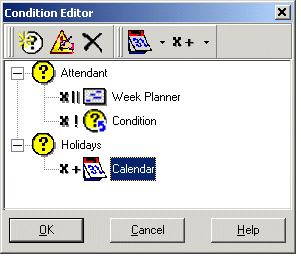
When a condition has been created, elements can be added and altered. A condition can consist of multiple elements, including several elements of the same type. In the example there are conditions added complete with elements.
The new condition is placed in the Condition Editor window. The condition is represented by the
 icon followed by the condition name.