

AVAYA DOCUMENTATION CENTER
Find answers to your technical questions and learn how to use our products
Administering IP Office Voicemail Pro
Mandatory announcement example
The screen below shows an example of a call flow that plays an announcement to any caller to the sales hunt group. Callers entering at this start point cannot bypass the announcement.
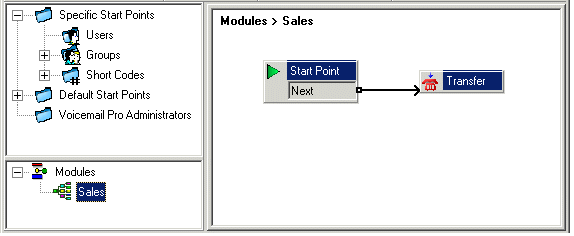
The Entry Prompt of the transfer action contains the announcement. After the announcement is played the caller is transferred to the sales hunt group as specified in the Specific tab. See Transfer Action. Once the call flow has been created, IP Office needs to be configured so that callers are transferred to the call flow. In IP Office Manager the destination for the incoming call route is entered as VM:Sales. The incoming call route targets the voicemail module 'Sales'. As the call flow module name is the same as the hunt group name, if voicemail is unavailable the call will automatically be routed to the hunt group. The calls will not be lost but the callers will not have heard the announcement. If calls are required to only be answered after they have heard the announcement, make sure that the call flow module name is different from the hunt group name. If voicemail is unavailable the call will not be transferred to the target hunt group.