

AVAYA DOCUMENTATION CENTER
Find answers to your technical questions and learn how to use our products
Administering IP Office Voicemail Pro
Test User Variable Action
The Test User Variable action has true and false connections that are followed according to whether the selected user variables current value matches a particular value. The Set User Variable action can be used in other calls to set the value of the variable. For an example of the action in a call flow, see User Defined Variables .
Procedure
- Click the
 Condition Actions icon.
 - Select
 Test User Variable.
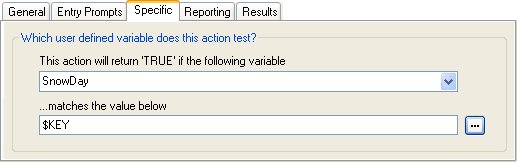
 - Select the Specific tab. Set the options as required.
Setting
Description
This action will return "TRUE" if the following variable
The name of the existing user variable to be checked.
Matches the value below
The value of the variable that will return a true result. Type the required value directly or use the browse button to select the text that should be used including using the value of a call variable .
Result
This action has the following results which can be connected to further actions:
True: This result connection is used by the call if the tested condition is currently true.
False: This result connection is used by the call if the tested condition is currently true.