

AVAYA DOCUMENTATION CENTER
Find answers to your technical questions and learn how to use our products
Administering IP Office Voicemail Pro
Generic: Arithmetic Evaluation
This Generic command performs an arithmetic operation on call variables. The result is then stored in a selected call variable. For non-numeric values the string can be changed using the String Manipulation option.
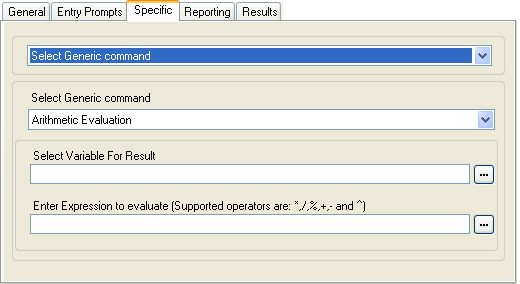
Setting |
Description |
|---|---|
Select Variable For Result |
Select the call variable into which the result of the arithmetic calculation should be stored. |
Enter Expression to Evaluate |
Enter Expression to evaluate: The string entered here can include numeric values, call variables such as
If the values being evaluated are integers (for example 123), the result will be an absolute integer value. For example 123/2 will result in 61. If any value being evaluated is a decimal (for example 123.0), the result will be a 6 decimal place value. For example 123.0/2 will result in 61.500000. |
Free Format Command: Arithmetic Evaluation
Using a Generic action, you can make voicemail perform an Arithmetic Evaluation action as a free format command. For example EVAL:$CP0=$CP1+$CP2+5, adds the current values of $CP1, $CP2 plus 5 and stores the result as $CP0.