

AVAYA DOCUMENTATION CENTER
Find answers to your technical questions and learn how to use our products
Administering IP Office Voicemail Pro
Customizing announcements
About this task
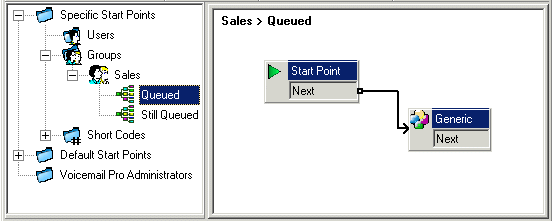
The announcements and actions provided to a caller can be customized using the Queued and Still Queued start points.
The Queued start point replaces the default Announcement 1.
The Still Queued start point replaces the default Announcement 2.
It is important to note that unconnected results in Queued and Still Queued call flows will return the caller to the queue rather than disconnect them. An attempt to return the caller using a Transfer or similar action places the caller at the back of the queue as a new call.
Do not use customized start point call flows for Queued and Still Queued if the Synchronize Calls option is enabled for the hunt group in the IP Office configuration. In such a case, the only option that Voicemail Prosupports is the playing of prompts.
To customize announcement 1 for a specific group:
Procedure
- In the Start Points Navigation pane, select
 Groups. If necessary add a Queued start point for the required group.
 - Click
 Save and make live
Next Steps
To customize announcement 2 for a specific group:
As above but use the Still Queued start point.