

AVAYA DOCUMENTATION CENTER
Find answers to your technical questions and learn how to use our products
Administering IP Office Voicemail Pro
'Outcalling' System Preferences
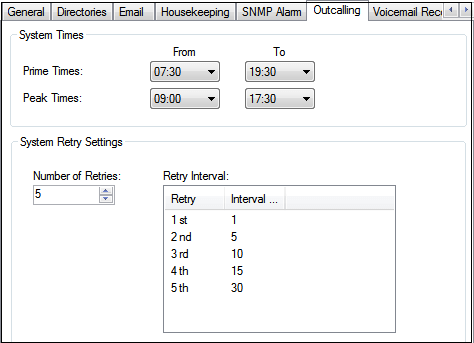
This tab sets the default settings for outcalling operation. This tab is not shown if outcalling is disabled. See Enabling/Disabling Outcalling.
Mailbox owners can then configure their own outcalling options from their telephone, for example, create their own time profile. You can also view and edit those individual user settings, see Configuring a user's outcalling settings
These settings can only be adjusted in the preferences of the central/primary voicemail server. The settings of other voicemail servers in the network automatically match those settings.
Setting |
Description |
|---|---|
System Times These fields set the define start and end times for two different time categories. The individual users can then select whether they want outcalling used during those time periods rather than having to manually define their own times for outcalling. |
|
Prime Times |
The time period that outcalling is to be active as default for the system. |
Peak Times |
The busiest working hours. |
System Retry Settings Set the default frequency for outcalling retries. |
|
Number of Retries |
Range 0 and 10. If the message is not collected after the last retry, no notification is sent until another new message is delivered in the user's mailbox. |
Retry Interval |
The retry interval for each successive retry. The interval is the length of time between each attempt to connect to the target number again. The 6th to 10th retries use the default retry interval. |