

AVAYA DOCUMENTATION CENTER
Find answers to your technical questions and learn how to use our products
Administering IP Office Voicemail Pro
Configuring fax server
About this task
Here is an illustration to show how a fax server can be configured to work with an IP Office system. The illustration applies to the following popular fax server applications:
Gfi FAXMaker
Fenestrae Faxination
Equisys Zeta ax
Captaris RightFax
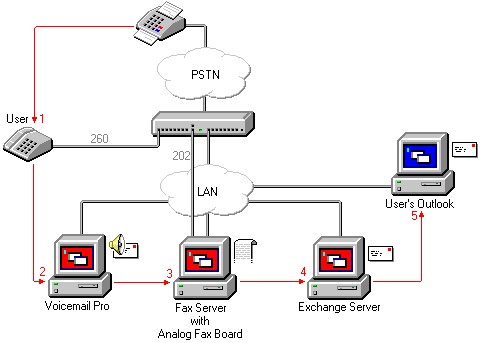
The fax server is configured to distribute faxes to exchange server mailboxes based on the original (DTMF) fax sub address that is passed by Voicemail Pro. For the fax server and Voicemail Pro to interact, specific user rights are needed.
If the computer that is being used as the fax server uses an analog fax board, the fax board must be connected to an IP Office analog extension (POT) port.
Before you begin
Before you configure a fax server to work with Voicemail Pro, you must:
Install the fax server software.
Install the hardware and connect it to an IP Office.
Install and configure the Exchange Connector.
For details of system requirements and information about installing a fax server, refer to the manufacturer documentation or visit the manufacturer web site.
The process for configuring a fax server to work with Voicemail Pro involves the following key steps:
Procedure
- Set the system fax number. See Setting the voicemail pro system fax number.
- If prefixed numbers are being used you can set up a short code so that fax calls are routed to prefixed numbers.
- If the chosen mailbox mode is Intuity, inform all mailbox owners that they can set up their own preferred fax destinations if they like. See Setting Up a User Defined Fax Number.
- If a system fax number is not being used, you can set up a menu action to route fax calls. See Route fax calls using a menu action.
- If the fax server computer uses an analog fax card, configure the extension number to use for faxes. See Configuring an Analog Extension Number for Fax Use.