

AVAYA DOCUMENTATION CENTER
Find answers to your technical questions and learn how to use our products
Administering IP Office Voicemail Pro
'Housekeeping' System Preferences
These preferences are used to:
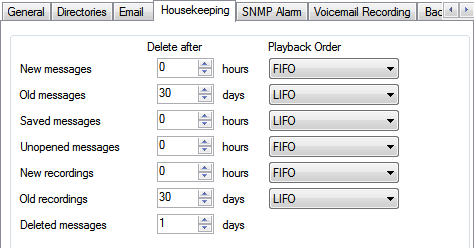
Set the duration after which voicemail server automatically deletes different types of messages and recordings.
The maximum mailbox size is limited by the server to 60 minutes of storage. The voicemail server housekeeping preferences should be used to ensure that aging messages are automatically deleted as appropriate to the customer's business requirements. For long term archiving of messages an application such as Media Manager should be used.
Set the default playback order for the different types of messages and recordings.
These settings can only be adjusted in the preferences of the central/primary voicemail server. The settings of other voicemail servers in the network automatically match those settings.
Setting |
Description |
|---|---|
Delete after |
Set the time after which you want the respective messages to be deleted automatically. A value of 0 disables automatic deletion (except for Deleted messages, where a value of 0 means immediate deletion). The actual deletion is performed during the next idle period, that is, when there are no calls to or from the voicemail server. |
Playback Order |
Set the order of playback for the respective message types. The available options are (FIFO (First in-First out ) and LIFO (Last in-First out). |
Message Type The following are the different categories of messages that the housekeeping settings apply to: |
|
New messages |
This status is applied to messages where neither the header nor the message content has been played. |
Old messages |
This status is applied to messages where the user has played the message content but has not marked the message as saved. |
Saved messages |
This status is applied to messages that have been marked as saved by the user. |
Unopened messages |
This status is used for messages where, in Intuity emulation mode, the user has played the message header but has not played the message content. |
New recordings |
This status is used for recordings that have not been played. |
Old recordings |
This status is used for recordings that have been played. |
Deleted messages |
This status is used for messages that have been marked as deleted through mailbox access. This setting is also used for messages that have been forwarded to an Exchange server. |