

AVAYA DOCUMENTATION CENTER
Find answers to your technical questions and learn how to use our products
Administering IP Office Voicemail Pro
Mailbox management
When you click on Users or Groups in the left-hand navigation pane, the right-hand pane displays information about the user or group mailboxes.
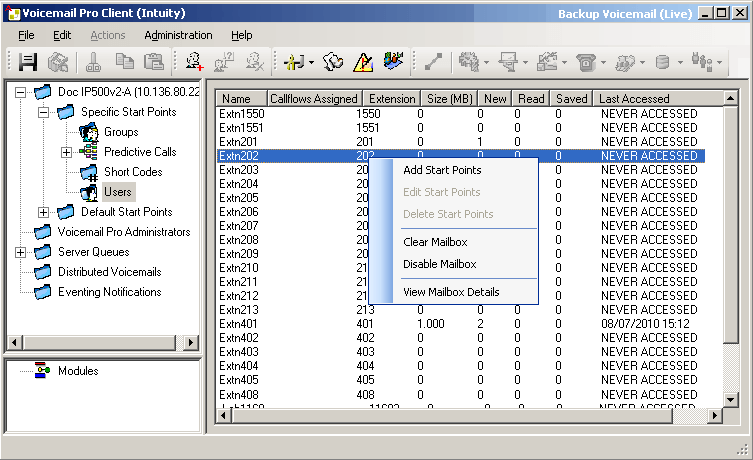
The information can be sorted by clicking on the column headers. The information available is:
Name: The user or group name used for the mailbox creation.
Callflows Assigned: The customized call flows created for the mailbox.
Extension: The associated extension number for the mailbox.
Size (MB): The current approximate size of the mailbox including all mailbox messages, recordings and prompts.
The maximum mailbox size is limited by the server to 60 minutes of storage. The voicemail server housekeeping preferences should be used to ensure that aging messages are automatically deleted as appropriate to the customer's business requirements.
New: The number of new messages in the mailbox.
Read: The number of read messages in the mailbox.
Saved: The number of messages marked as saved in the mailbox.
Last Accessed: The date and time the mailbox was last accessed.
Web Voicemail: Whether the mailbox is accessible via UMS Web Voicemail and whether it is currently being accessed.
Unopened: The number of messages in the mailbox that have never been opened. This is different from new as messages can be changed from being read or saved to being marked as new.
Exchange Messages: Whether the mailbox is configured to forward messages to an exchange server e-mail account.
If you right-click a mailbox, a list of options are available:
Add Start Points/Edit Start Points/Delete
If the mailbox has any customized call flow start points setup, they are listed in the Callflows Assigned column. Use these options to add additional start points. A list of start point types is displayed which you can then select or deselect. Selecting an option will create a matching start point for the mailbox. Deselecting an option will delete the matching start point and any content.
Clear Mailbox
This option will reset the mailbox. All existing messages and recordings are deleted and any prompts such as the user name and greeting prompts. The mailbox password is not reset. This action is not applied to messages for users using an Exchange server as their message store.
Disable Mailbox
This option will stop the use of mailbox to receive messages. This includes the forwarding of messages to the mailbox and manual or automatic recording placing recordings into the mailbox. If you select this option, also disable the Voicemail On setting within the IP Office configuration to prevent IP Office from using the mailbox. This option does not affect any existing messages in the mailbox. Disabled mailboxes are listed as DISABLED in the Last Accessed column. See Disabling a Mailbox .
View Mailbox Details
This option is available for user mailboxes. Use this option to view and edit various user mailbox settings including the user's alternate numbers, outcalling settings and personal distribution lists.