

AVAYA DOCUMENTATION CENTER
Find answers to your technical questions and learn how to use our products
Administering IP Office Voicemail Pro
Variable Routing Action
This action routes calls based on whether a selected call variable matches any of the numbers specified by the action's settings.
The selected variable is checked for a match against the set of specified strings. If there are multiple matches, the one with the most matching digits (excluding wildcards) is used. If several equal length matches are found, the first one in the list is used.
Procedure
- Click the
 Telephony Actions icon.
 - Select
 Variable Routing.
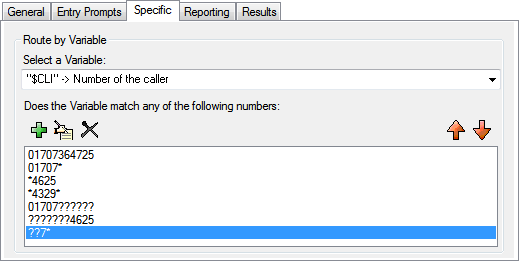
 - Select the Specific tab. Set the options as required.
Settings
Description
Select a Variable
This drop down is used to select the call variable against which the values are checked for a match.
Variables not available in the drop-down list may be used by saving the current value of the variable to one of the
$CPvalues. This can be done using a Generic action set to Set CPxx Value. For exampleCP1:$MONTHsaves the value of$MONTHto$CP1.The variable
$REG[name]can be used to access the current value of a user variable. For example,$REG[UV1]accessing the value of a user variable calledUV1. Using the method above can be used to save this as a$CPvalue. For example,CP2:$REG[UV1].
Does the Variable match any of the following numbers
The area below lists the numbers against which the selected variable will be selected for a possible match. If the variable matched multiple numbers in the list, the routing for the match nearest the top of the list is used.
Numbers can include a ? wildcard to represent any single digit, with multiple ?'s to represent a matching number of digits.
Numbers can include a * wildcard to match any digits including multiple digits.
The following are examples of how matching is applied:
01707364725 will only match that number exactly.
01707* will match any number beginning with 01707.
*4625 will match any number ending in 4625.
*4329* any number containing 4329.
01707?????? will match any 11 digit number beginning with 01707.
???????4625 will match any 11 digit number ending in 4625.
??7* will match any number with 7 as the third digit.
Result
This action has a separate result for each number string entered for matching plus a No Match result.