

AVAYA DOCUMENTATION CENTER
Find answers to your technical questions and learn how to use our products
Administering IP Office Voicemail Pro
Transfer Action
About this task
This type of action transfers the caller to the extension that matches the mailbox selected. This is a blind transfer; if the call returns to the voicemail server again, for example if unanswered, it will be treated as a new call. More advanced transfers are done using either a Call List or Assisted Transfer.
Procedure
- Click the
 Telephony Actions icon.
 - Select
 Transfer.
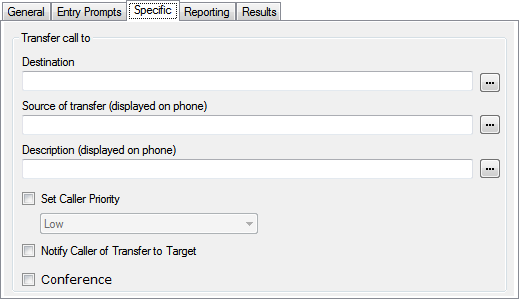
 - Select the Specific tab. Set the options as required.
Setting
Description
Destination
Enter the number of the destination for the transfer. This can include IP Office short codes or numbers specified by the current value of a Voicemail Pro call variable such as
$KEY. Type the required text directly or use the browse button to select the text that should be used including using the value of a call variable.Source of transfer
The number to display on the destination telephone if internal. Type the required text directly or use the browse button to select the text that should be used including using the value of a call variable.
Description
The text description to display on the destination telephone if internal. Type the required text directly or use the browse button to select the text that should be used including using the value of a call variable.
Set Caller Priority
If selected, the caller's priority can then be set to Low, Medium or High. A call variable set to 1, 2 or 3 can also be used to set Low, Medium or High priority respectively.
When the system presents calls to a hunt group on the IP Office, IP Office uses the call priorities followed by the call waiting times to order the calls in the queue. By default, internal callers are assigned Low priority while the priority of external callers is set by the IP Office Incoming Call Route used to route the call (default also Low).
Do not mix calls of different priorities if you are using Voicemail Pro to announce the queue estimate time to answer (ETA) and the queue position to callers, since those values will no longer be accurate when a higher priority call is placed into the queue. Note that in such a situation, Voicemail Pro will not increase a value already announced to a caller.
Notify Caller of Transfer to Target
If enabled, the caller is notified of a call transfer. If a recorded name for the destination is available, the message "Transferring to" followed by the associated mailbox name of the destination is played to the caller, else the message "Please wait, you are being transferred" is played. This follows any prompts selected in the Entry Prompts list above.
Conference
Transfer the caller to a conference matching the destination number.
Result
This action does not have any result. It cannot be connected to a following action.