

AVAYA DOCUMENTATION CENTER
Find answers to your technical questions and learn how to use our products
Administering IP Office Voicemail Pro
Whisper Action
The Whisper action plays a recording made by the caller to a transfer target while the caller is on hold. While listening to the recording and prompts the transfer target can either accept the call by pressing 1 or reject the call by pressing any other key or hanging up.
The caller recording is obtained by a Voice Question or Listen action preceding the Whisper action. The Whisper action also sets several text items for display on the transfer target extension and for prompts to be played before and after the caller's recording.
You can use the action without requiring a recording. The transfer target decides whether to accept or reject the call based on the displayed information and the prompts if they have been setup. Voicemail also accepts the whisper call transfer automatically after the recording (if any) and after prompts have been played to the transfer target.
Procedure
- Click the
 Telephony Actions icon.
 - Select
 Whisper.
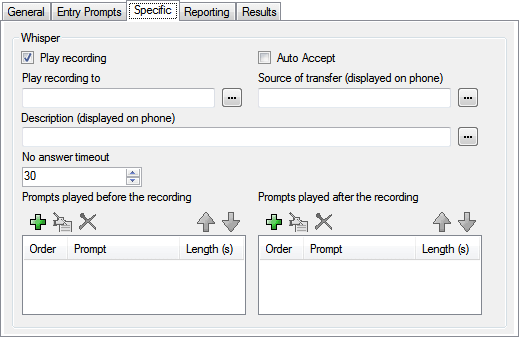
 - Select the Specific tab. Set the options as required.
Setting
Description
Play recording
If not selected, the call is presented to the target without playing the caller's recording. This allows the action to be used without requiring a recording from the caller. The prompts before and prompts after recording are still played if they have been setup.
Auto Accept
If selected, after the recording has been played the caller is automatically connected without the target extension having to accept the call. If this option is used, the Reject result connection is not useable. If the user extension is set to auto-answer, the whisper call is answered, the recording and prompts played and the call connected without any action by the target.
Play recording to
Enter the extension that is rung with the caller's recording.
Source of transfer
The number to display on the destination telephone if internal. Type the required text directly or use the browse button to select the text that should be used including using the value of a call variable.
Description
The text description to display on the destination telephone if internal. Type the required text directly or use the browse button to select the text that should be used including using the value of a call variable.
No answer timeout
Select how long the voicemail server should wait for an answer before following the No Answer result connection.
Prompts played before the recording
Select the prompts that are to be played to the target extension when they answer the call. The prompts played after the caller's recording should include the instruction "Press 1 to accept or hang up to reject".
Prompts played after the recording
Result
This action has the following results which can be connected to further actions:
Next: Route the call to a following action in the call flow. This connection can be followed even after the caller has hung up if the Start action option Complete Sequence has been selected.
No Answer: This result connection is used if the transfer target does not answer the call within the action's set timeout.
Busy: This result connection is used if the transfer target returns busy to the whisper call.
Reject: This result connection is used if the transfer target rejects the call by pressing any key other than 1 or by hanging up.