AVAYA DOCUMENTATION CENTER
Find answers to your technical questions and learn how to use our products
Administering Avaya Contact Center – Extended Capacity
User management
Avaya Contact Center – Extended Capacity provides six user roles. A user role determines the level of access that the user has to the Configuration Server functionality.
User roles can be global or local. A global role contains a set of user permissions to access the Configuration Server applications. User permissions for certain applications, such as the Contact Center Administration, System Administration, and Online Help, are called local roles.
A super administrator can manage users and user permissions in the Security App. When adding a user, the super administrator can assign the user with a default global role or configure a specific global role with appropriate permissions. Only the super administrator has access to the Security App.
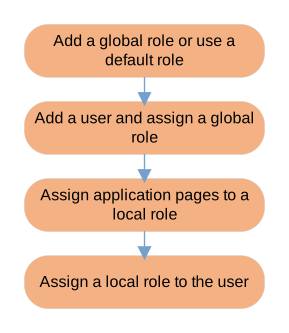
The following diagram shows a high-level sequence of procedures that the super administrator uses for managing users on the Configuration Server web portal: