

AVAYA DOCUMENTATION CENTER
Find answers to your technical questions and learn how to use our products
Avaya Device Adapter Snap-in Reference
Digital 2216 phone
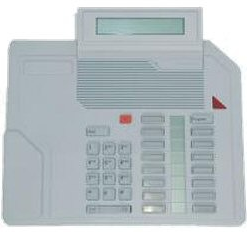
The preceding picture is of an M2216 digital phone with the optional display. If the display is present, then the top key on the right-hand button column (key 7) must be for the Program key. The Program key allows to set the display options. Note that the 2216 phone is intended for the call center environment and has a plug-in-headset that can be used for agent login and logout. Inserting or removing the headset logs in and logs out the agent at this station.
It has 16 keys (buttons) that can be configured as any of a number of features.
The bottom button, which is key 0, is always assigned as the call center extension and position ID. The other fifteen buttons can have any feature desired. However, normally one is transfer and another is conference. Some of the remaining keys are assigned call center functions such as call supervisor.
The LCD lamp beside the key shows nothing to indicate Off. A lit triangle pointing at the button indicates On. A flashing triangle is for different events such as ringing. The lamps are between the buttons, so half the triangles point left (the ones to the right of their buttons), while the other half point right.
The 2216 phone supports attaching one or more expansion modules to add the following:
-
22 additional buttons (one module)
-
44 additional buttons (two modules)