

AVAYA DOCUMENTATION CENTER
Find answers to your technical questions and learn how to use our products
Avaya Device Adapter Snap-in Reference
Personal directory, redial list, and callers list feature description
This button allows the user to access their personal directory, check the callers list (possibly calling someone on the list), or redial one of the previously called parties.
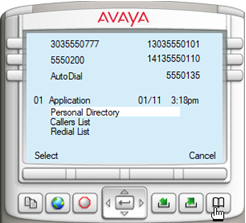
When a list is selected, the user can scroll up or down, shift right to see more details, or shift left to return to the display.
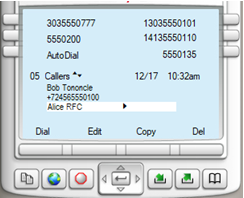
This shows a callers list accessed through this menu, scrolled partway down (the “05 Callers” indicates we are looking at the fifth element in the callers list), and the upward facing and downward facing triangles indicate we can scroll up or down. Beside the highlighted name is a right facing triangle, indicating we can use the right navigation button to see more details.
The soft keys indicate options we can carry out with this entry:
-
DialCall the user.
-
EditEdit the information, which allows the user to remove “Bob Tononcle” from the top entry shown.
-
CopyCopy the entry to add to Personal Directory.
-
DelDelete the entry