AVAYA DOCUMENTATION CENTER
Find answers to your technical questions and learn how to use our products
Avaya Device Adapter Snap-in Reference
Importing Media Gateway Controller configuration
Use the following procedure to import the Media Gateway Controller configuration file created by ProVision.
- Log on to System Manager by using the appropriate administrative credentials.
- Select from the menu.
- Select .
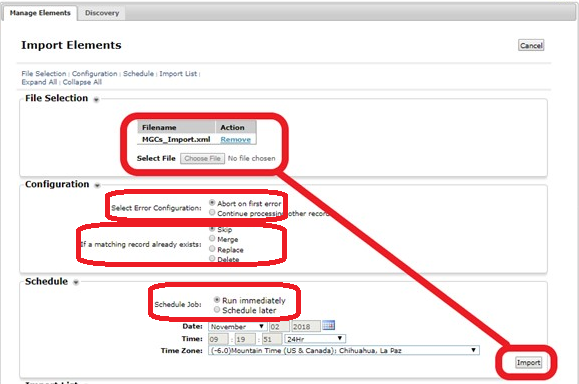
- Click Choose File.
- Select the MGC_Import.xml file created by ProVision.
- Click OK.
- Select Abort on first error in the Select Error Configuration field.
- Select Skip in the If a matching record already exists field.
- Select Run immediately in the Schedule Job field.
- Click Import.
ADDITIONAL INFORMATION: