

AVAYA DOCUMENTATION CENTER
Find answers to your technical questions and learn how to use our products
Avaya Device Adapter Snap-in Reference
Configuring locations
- To define the location:
- Enable Multiple location handling on Communication Manager.
ADDITIONAL INFORMATION:You can use the System Management Interface on Communication Manager to add the capability.By default, the system has location 1 defined and all stations (etc.) will belong to this location.
- Ensure that multiple location programming is enabled. Define additional locations as needed to match the geographical areas where the calls must break out to the public domain.
ADDITIONAL INFORMATION:
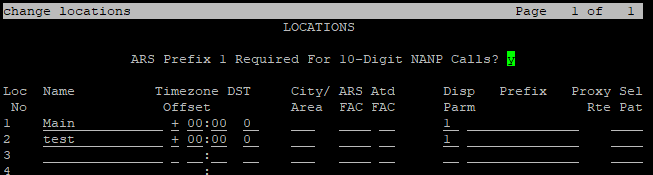
- Enable Multiple location handling on Communication Manager.
- To define the network regions, do one of the following:
- On the System Manager web console, navigate to .
- Use the Communication Manager SAT interface and type change ip-network-region and define the network regions.
ADDITIONAL INFORMATION:Note:-
The region requires a location to map it to if the calls are to route through a specific gateway.
-
By default, region 1 has location 1, and all endpoints use this region.
In the following example, location 2 is used for the region 2:
- To map IP addresses of the SIP endpoints and MGCs or MG-XPECs to different regions, do one of the following:
- On the System Manager web console, navigate to .
- Use the Communication Manager SAT interface and enter change ip-network-map.
ADDITIONAL INFORMATION:Configure 911 information whenever the number will not necessarily terminate correctly on the right PSAP. Configure other information as required.
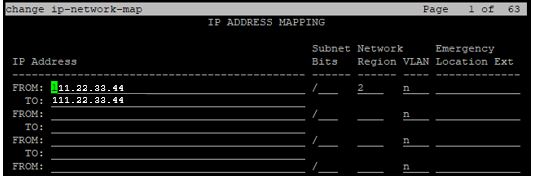 The preceding image shows region 2, which maps to location 2. The IP address can be that of the UNIStim endpoint, the IP address of a PC running a 2050 client, an MGC management port IP address, or an MG-XPEC management port IP address.
Result
This enables Communication Manager to route calls from endpoints based on the location of the endpoint. Regions can be created mapping to the default location (that is, to location 1), but this will not affect routing. All calls will still use location 1 settings and gateways for routing calls until location 2 (or greater) is defined and used.
Next steps
Further administration is required to enable the specific service or option for a service requiring location-based origination. Refer to Communication Manager documentation for specific features and the administrative requirements to enable them.
Note:
Device Adapter is unaware of the locations and regions to which its stations or MGCs/MG-XPECs belong. This is handled entirely within Communication Manager. However, the administrator needs to be aware of the configuration required to make this work correctly on Communication Manager and must implement the programming required.