

AVAYA DOCUMENTATION CENTER
Find answers to your technical questions and learn how to use our products
Avaya Device Adapter Snap-in Reference
CS 1000 states and Avaya Aura® Call Center Elite work modes
Both Avaya Aura® Call Center Elite and CS 1000 support the same hierarchical
statemodel. This model consists of the three following levels:
-
Main Login states: The agent can be either logged in or logged out. The respective states are
Logged In
andLogged Out
. -
Work Mode states: When the agent is logged in, the agent either may or may not take calls. The respective states are
Available
andUnavailable
. -
Call Processing states: When the agent is available to take calls, this level includes the states for handling a call.This level includes states such as the following:
-
Idle: The agent is idle.
-
Ringing: The agent is receiving a notification of a new call.
-
Answered: The agent answers the call.
-
Clearing: The call is released by either party.
-
While Main Login and Call Processing levels are the same for both Avaya Aura® Call Center Elite and CS 1000, the Work Mode level has some differences:
-
When the agent is available to take calls, Avaya Aura® Call Center Elite has two variants of states, while CS 1000 has a single state.
-
When the agent is unavailable to take calls, Avaya Aura® Call Center Elite has two variants of states, while CS 1000 has a single state.
The Avaya Aura® Call Center Elite Work Mode level states are called
work modesin documentation.
In the scope of this section, the following terms are used:
-
Avaya Aura® Call Center Elite work modes
to refer to specific Avaya Aura® Call Center Elite Work Mode level states. -
CS 1000 states
to refer to CS 1000 Work Mode level states.
Avaya Aura® Call Center Elite work modes and corresponding CS 1000 states are not the only conditions that affect agent endpoints. Agents cannot have a call center work mode unless they log in to the call center. However, Avaya Aura® Call Center Elite work modes and equivalent CS 1000 states are similar.
|
Main Login state
|
CS 1000
|
Avaya Aura® Call Center Elite
|
Notes
|
|---|---|---|---|
|
Logged out
|
Logged out
|
Logged out
|
Agents can only perform Unified Communication operations, with few exceptions, such as checking the queue status or communicating with supervisors. Agents cannot handle calls.
|
|
Logged in
|
Logged in
|
Logged in
|
Agents can perform call center operations depending on their current work mode.
|
The following table displays supported CS 1000 states and equivalent Avaya Aura® Call Center Elite work modes when the agent is logged in:
|
Work Mode state when logged in
|
CS 1000 states
|
Avaya Aura® Call Center Elite work modes
|
Notes
|
|---|---|---|---|
|
Unavailable for calls
|
Not Ready
|
Aux Work
After Call Work
|
Aux Work (Auxiliary Work) is the most common equivalent to the CS 1000 Not Ready state. However, Not Ready also enables the agent to perform and record post call processing tasks related to ACD calls.
|
|
Available for calls
|
Ready (informal name. The state has no formal name).
|
Auto-In
Manual-In
|
CS 1000 has an equivalent to Auto-In, but has no direct equivalent to Manual-In.
CS 1000 documentation refers to these states as re-entering the queuewhen the agent becomes available or able to receive ACD calls. |
Avaya Aura® Call Center Elite defines the following two states, or work modes, for the Not Ready state:
-
Not Ready state for completing After Call Work.
-
Not Ready state for performing any other operation, such as taking a coffee break.
CS 1000 unifies both these states into a single Not Ready state.
While the agent is logged in, the mode remains constant, but the agent state changes based on whether the agent receives the call, answer the call, modifies the call and so on. For example, if the agent in the Auto-in mode receives and processes a call, this Auto-in mode remains during all phases of the call. The mode does not change when the agent state changes.
CS 1000 availability transitions
The following diagram shows CS 1000 availability transitions:
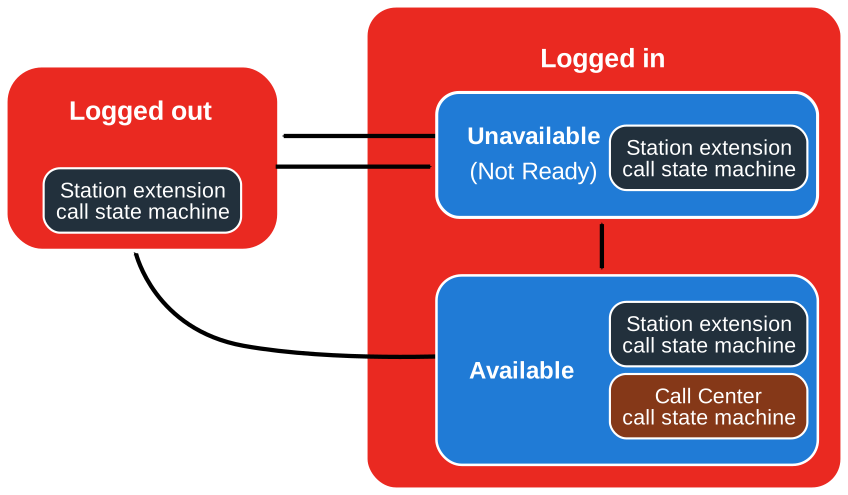
CS 1000 enables the agent to perform the following transitions:
-
Logging in and remaining in the Unavailable, or Not Ready, state.
-
Logging out from both Unavailable and Available states.
-
Switching between Unavailable and Available states.
The call state machines exist within all availability states. However, the call center call state machines are only available when the state is Available.
Avaya Aura® Call Center Elite availability transitions
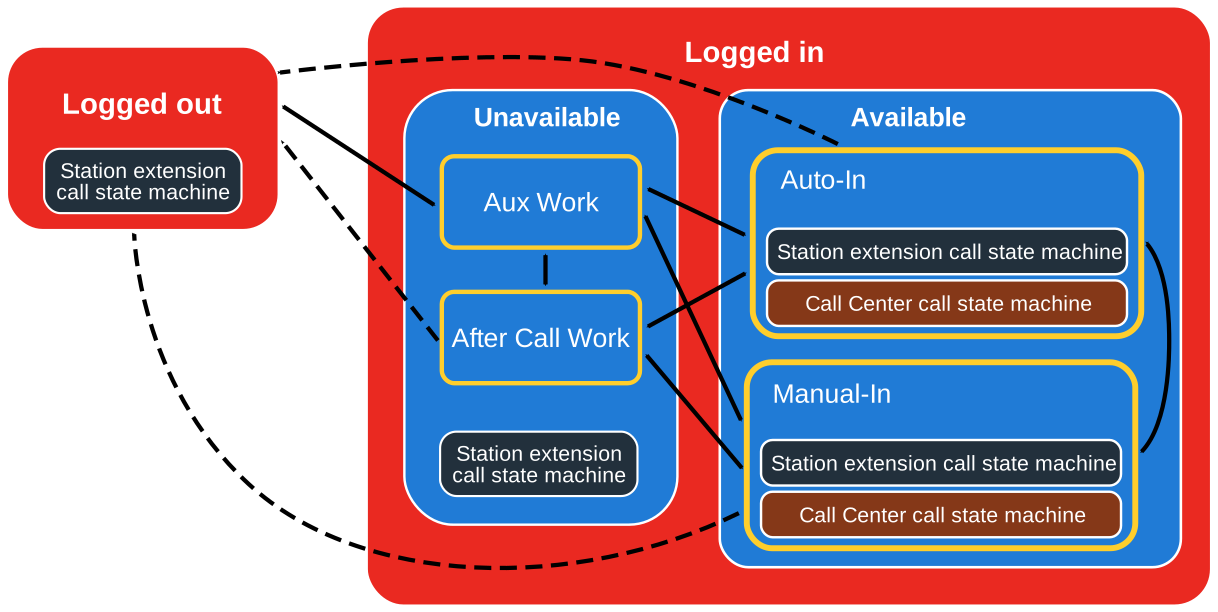
The following diagram shows Avaya Aura® Call Center Elite availability transitions:
|
Connector
|
Description
|
|---|---|
 |
One-way transitions.
|
 |
Two-way transitions.
|
Avaya Aura® Call Center Elite enables the agent to perform the following transitions between work modes and states:
-
Switching between work modes in the Unavailable state.
-
Switching between work modes in the Available state.
-
Logging in and remaining in the Unavailable state. In this case, the agent work mode is Aux Work.
-
Logging out from any work mode in both Unavailable and Available states.
-
Switching between any work mode in the Unavailable state and any work mode in the Available state.
Similarly to CS 1000, call state machines exist within all availability states. However, the call center call state machines are only available when the agent work mode belongs to the Available state.
Note:
Avaya Aura® Call Center Elite can change the device state. For example, after the agent logged in, Avaya Aura® Call Center Elite can change the agent work mode to Auto-In.