AVAYA DOCUMENTATION CENTER
Find answers to your technical questions and learn how to use our products
Avaya Device Adapter Snap-in Reference
Communication Manager feature support
Communication Manager provides all feature support on Device Adapter.
The following table indicates whether Device Adapter supports or partially supports the Communication Manager features, along with the type of user experience.
For features listed in the table, Device Adapter provides a user experience similar to the following:
-
CS 1000
-
CS 1000, but with minor differences
-
Avaya Aura®
-
Both CS 1000 and Avaya Aura® depending on the feature configuration
|
Communication Manager service/feature
|
Supported
|
User experience similar to
|
Comments
|
|---|---|---|---|
|
Abandoned Call Logging
|
Yes
|
CS 1000
|
The logs are logged in the caller’s logs.
|
|
Abbreviated Dialing
|
Yes
|
Both of the following:
|
You can configure this feature to simulate several CS 1000 features.
Otherwise, the user experience is similar to Avaya Aura®.
|
|
Abort Transfer
|
Yes
|
CS 1000
|
User operation for this feature is the same as CS 1000.
For more information, see Transfer — blind or consultativein Appendix H: Call processing features and services. |
|
Account Codes
|
Yes
|
CS 1000, with minor differences.
|
Differences exist in how you administer this feature in CS 1000.
However, the user experience is similar to CS 1000, with minor differences.
|
|
Announcements
|
Yes
|
CS 1000, with minor differences.
|
Differences exist in how you administer this feature in CS 1000.
However, the user experience is similar to CS 1000, with minor differences.
|
|
Authorization Codes
|
Yes
|
CS 1000, with minor differences.
|
The number or length of the authorization codes may differ. However, the user experience is similar to CS 1000, with minor differences.
|
|
Automatic Callback
|
Yes
|
Depending on the configuration, the user experience is similar to the following:
|
You can configure this feature to simulate the CS 1000 Ring Again feature.
Depending on how you configure this feature, the user experience can be the following:
|
|
Automatic Dial Buttons
|
Yes
|
CS 1000, with minor differences.
|
For more information, see Autodialin Appendix H: Call processing features and services. |
|
Automatic Exclusion
|
Yes
|
Depending on the configuration, the user experience is similar to the following:
|
You can use this feature to configure the Privacy Release settings for a CS 1000 user experience.
|
|
Automatic Route Selection (ARS)
|
Yes
|
Avaya Aura®
|
You can configure this feature to perform the Network Alternate Route Selection (NARS), Basic Alternate Route Selection (BARS), or Coordinated Dialing Plan (CDP) call routing functions of CS 1000.
|
|
Bridged Line (Call) Appearances
|
Yes
|
Depending on the configuration, the user experience is similar to the following:
|
You can use Bridged Call Appearances for the MADN SCA and MCA features.
However, you can configure Bridged Line and Call Appearances to provide an Avaya Aura® user experience.
|
|
Button Module
|
Yes
|
CS 1000, with minor differences.
|
Button Modules are supported only on those CS 1000 stations that support button modules.
The physical device determines the number of buttons per module, although some modules, with two or more pages, are programmed as though they were two or three smaller modules.
Some stations may limit the maximum number of button modules allowed.
|
|
Call Coverage (6 levels)
|
Yes
|
Avaya Aura®
|
The CS 1000 second-level call forward permits up to two coverage options.
Second-level call forward means forwarding a forwarded call.
|
|
Caller ID (Name and number)
|
Yes
|
CS 1000, with minor differences.
|
Device Adapter provides the CS 1000 user experience for this feature depending on the message contents received.
The message contents can differ because of third-party interoperability.
|
|
Call Forward (All call, Busy, No answer, Disable)
|
Yes
|
CS 1000, with minor differences.
|
For more information, see Call forwardin Appendix H: Call processing features and services. |
|
Call Hold, Resume
|
Yes
|
CS 1000
|
|
|
Call Log Missed/Answered/Outgoing calls (Call/Delete/Details)
|
Yes
|
CS 1000, with minor differences.
|
Call log uses logs from Personal Directory and other related logs.
For more information, see Appendix H: Call processing features and services. |
|
Call Park, Answer Back
|
Yes
|
Depending on the configuration, the user experience is similar to the following:
|
If you use the Avaya Breeze® platform Park and Page feature, the user experience is similar to CS 1000.
Otherwise, the user experience is similar to Avaya Aura®.
|
|
Calling Party Number Block, Unblock of Internal Numbers
|
Yes
|
Avaya Aura®
|
Parts of this feature support the CS 1000 Privacy service.
You can disable CS 1000 Calling Party Privacy setting. However, this is not supported in Device Adapter Release 8.1.2 and Avaya Aura® Release 8.1.2.
If you do not modify the configuration of the Communication Manager FAC, CS 1000 FFC, or any other setting of this feature, the user experience for Privacy operations is similar to CS 1000.
It is the Avaya Aura® service, with all Avaya Aura® capabilities. The key parts for CS 1000 FFC handling are similar to the Avaya Aura® model. However, based on the additions, the overall experience is similar to the Avaya Aura®.
|
|
Call Pickup
|
Yes
|
CS 1000, with minor differences.
|
For more information, see Call Pickupin Appendix H: Call processing features and services. |
|
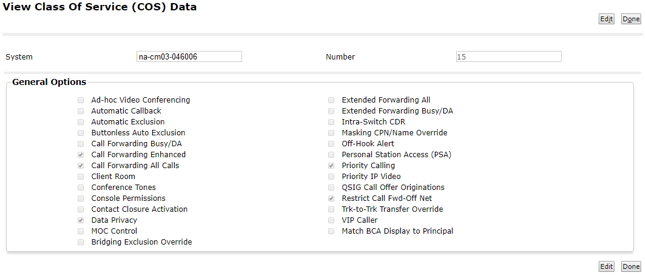
Class of Service (CoS)
|
Yes
|
Both of the following:
|
A CS 1000 CoS may or may not have a matching Avaya Aura® CoS.
The following are the configuration options:
|
|
Code Calling
|
Yes
|
Avaya Aura®
|
Tone-based loudspeaker paging.
|
|
Conference (Ad-hoc six-party)
|
Yes
|
CS 1000, with minor differences.
|
Some CS 1000 sets use three-party conferences. Whereas, Device Adapter sets use only six-party conferences.
|
|
Contacts (Add/Edit/Delete/Details)
|
Yes
|
CS 1000, with minor differences.
|
Uses Personal Directory and related logs.
|
|
Core Redundancy
|
Yes
|
Avaya Aura®
|
|
|
Crisis Alert (Dial/View)
|
Dial only
|
Avaya Aura®
|
This feature provides 911 call paging capability.
The crss-alert button is not supported on the CS1K-IP and CS1K-IPCC endpoints. However, you can dial an emergency call for the crisis alert feature from the CS1K endpoints.
|
|
Directed Call Pickup
|
Yes
|
CS 1000, with minor differences.
|
Device Adapter maps the Avaya Aura® feature to the CS 1000 PUDN FFC.
However, although there are minimal differences visible to the user, CS 1000 requires the user to belong to a pickup group. This is not required in the Avaya Aura® equivalent feature.
|
|
Directory (Aura Integrated)
|
Yes
|
Avaya Aura®
|
Uses Corporate Directory.
|
|
Exclusion
|
Yes
|
CS 1000, with minor differences.
|
The Exclusion feature of Avaya Aura® and the Privacy feature of CS 1000 are similar.
This includes the station setting and the Privacy key and Exclusion button function.
For more information, see Privacyin Appendix H: Call processing features and services. |
|
Extended Call Pickup
|
Yes
|
CS 1000, with minor differences.
|
Device Adapter maps the Avaya Aura® feature to the CS 1000 Group Call Pickup feature.
Depending on the Extended Call Pickup feature configuration, there might be no visible user experience difference.
However, Avaya Aura® requires the user group to belong to an extended pickup group, which is not required in the CS 1000 Group Call Pickup feature.
|
|
Extension to Cellular (EC500)
|
Yes
|
Both of the following:
|
Uses FAC to change state.
Neither the CS 1000 station nor the Device Adapter station is aware of the call routing to cellular.
|
|
Feature Name Extensions
|
Yes
|
Avaya Aura®
|
Used by EC500.
|
|
Forced Entry of Account Codes
|
Yes
|
Avaya Aura®
|
|
|
Hold Recall
|
Yes
|
Avaya Aura®
|
Hold Recall re-rings the station that placed it on hold if the station is idle.
|
|
Hotline
|
Yes
|
CS 1000, with minor differences.
|
Uses abbreviated dialing.
Two-way hotline user experience is similar to CS 1000.
One-way hotline uses Autodial after the user selects a call appearance. This is similar to the Avaya Aura® user experience.
|
|
Hunt Groups
|
Yes
|
Both of the following:
|
Linear (direct department calling) and round-robin (circular) align with CS 1000 handling of the Hunt Groups feature.
However, Avaya Aura® has more alternatives for the Hunt Groups feature.
|
|
Idle Line Appearance Select
|
Yes
|
Depending on the configuration, the user experience is similar to the following:
|
Avaya Aura® allows differentiation between appearances shared by multiple users and private call appearances.
|
|
Last Number Dialed
|
Yes
|
CS 1000, with minor differences.
|
Last Number Dialed is generically available for digital and UNIStim stations by doing one of the following:
For more information, see “Last Number Redial” in “Appendix H: Call processing features and services.”
|
|
Limit Number of Concurrent Calls
|
No
|
Avaya Aura®
|
In CS 1000, there is no direct equivalent feature for the Limit Number of Concurrent Calls feature.
However, you can configure a single key for the directory number in a CS 1000 station to automatically limit the number of concurrent calls.
|
|
Local Survivability with Survivable Remote
|
Yes
|
Avaya Aura®
|
|
|
Loudspeaker Paging
|
Yes
|
Avaya Aura®
|
By using loudspeaker paging, a CS 1000 user can call the paging trunk.
|
|
Loudspeaker Paging – Deluxe
|
Yes
|
Avaya Aura®
|
A corresponding Park & Page feature exists in CS 1000, but the user experience is different.
|
|
Malicious Call Trace (MCT) - Activation
|
Yes
|
Both of the following:
|
MCT activation has the same user experience as the CS 1000.
However, deactivating MCT requires a non-SIP station to act as an MCT controller in CS 1000.
To Avaya Aura®, all Device Adapter stations are SIP stations.
|
|
Meet-Me Conferencing – CM
|
Yes
|
Both of the following:
|
The user experience may differ from that of CS 1000 based on the specific CS 1000 Meet-Me conference bridge.
The user experience depends on how the bridge service handles the conference.
|
|
Message Retrieval (one button)
|
Yes
|
Avaya Aura®
|
Message retrieval is part of the Message Waiting feature in CS 1000.
Avaya Aura® provides the ability to retrieve system-wide posted messages.
|
|
Message Waiting Indication (own number)
|
Yes
|
CS 1000, with minor differences.
|
Message Waiting Indication, including audible indication and lamp state, is part of the Message Waiting feature in CS 1000.
In the Avaya Aura® documentation, the Message Waiting feature is also referred to as the Leave Word Calling feature.
|
|
Multiple Call Handling, Multiple Lines, Multiple Call Appearances
|
Yes
|
Depending on the configuration, the user experience is similar to the following:
|
The specific user experience depends on whether the call appearances are implemented as the CS 1000 model of bridged call appearances, or whether the standard Avaya Aura® model is used.
|
|
Multiple Device Access
|
Yes
|
CS 1000, with minor differences.
|
Ensure that there is only one device registered at one time. If multiple concurrent devices are registered, problems can occur in case of a network failure.
For example, an endpoint that lost connection to Device Adapter or Device Adapter that lost connection to Session Manager or Communication Manager may be unable to register successfully.
|
|
Ringing Control - Bridged Line
|
Yes
|
Depending on the configuration, the user experience is similar to the following:
|
System Manager or Communication Manager configuration.
The Ringing Control - Bridged Line feature aligns with the implementation of the appearances.
You can use the following bridged or call appearance options, as applicable, to map the CS 1000 and Device Adapter feature:
Otherwise, the Avaya Aura® model is used.
|
|
Send All Calls
|
Yes
|
Depending on the configuration, the user experience is similar to the following:
|
The station displays the button name as Make Set Busy.
If you configure the Send All Calls feature to mimic the Make Set Busy feature, the user experience is similar to CS 1000.
Otherwise, the user experience is similar to Avaya Aura®.
|
|
Time of Day Routing
|
Yes
|
Depending on the configuration, the user experience is similar to the following:
|
CS 1000 and Avaya Aura® have Time of Day-based routing. Although, the implementation differs significantly, and the user experience depends on the configuration of this feature.
|
|
Traffic Measurements
|
Yes
|
Avaya Aura®
|
|
|
Transfer (Attended, Unattended)
|
Yes
|
CS 1000, with minor differences.
|
CS 1000 and Avaya Aura® provide similar transfer handling for specific stations. However, the Avaya Aura® SIP stations differ from the Avaya Aura® H.323 and digital stations. The CS 1000 behavior closely matches the behavior of the H.323 and digital stations.
Device Adapter maps the behavior to provide a user experience similar to CS 1000.
|
|
VIP Calling
|
Yes
|
Avaya Aura®
|
|
|
Automatic Hold
|
Partially supported
|
Avaya Aura®
|
The Automatic Hold feature allows you to switch between the current held party and active party, and vice-versa.
Device Adapter does not rely on the configuration parameters in System Manager. The service is always on.
|
|
Calling Party Number Block, Unblock
|
Partially supported
|
Avaya Aura®
|
CS 1000 has an equivalent feature for the 911 call center equivalent.
|
|
Group Paging
|
Partially supported
|
Avaya Aura®
|
Some CS 1000 station types do not have speakers and cannot receive pages.
|
|
Multiple Level Precedence and Pre-emption (MLPP) TDM Trunking
|
Partially supported
|
Avaya Aura®
|
CS 1000 supported MLPP for the Federal market as a server feature. You must follow specific administration procedures to access the software feature documentation.
MLPP signaling is provided over applicable ISDN variants and – to a limited extent – over H.323 and SIP trunks in the network. However, CS 1000 Release 5 was the last release that was JITC certified.
|
|
Priority Calling
|
Partially supported
|
Avaya Aura®
|
|
|
Simulated Bridged Appearance
|
Partially supported
|
Avaya Aura®
|
Dual-registration does not work for a Device Adapter UNIStim user.
|
|
Station On-Hook Dialing
|
Partially supported
|
CS 1000
|
The CS 1000 Predial and Initiate feature is equivalent to the Station On-Hook Dialing feature, but the behavior differs significantly.
The Predial and Initiate feature that is used on CS 1000 conforms to Avaya Aura® and is supported. User can predial while on hook, and then initiate like the CS 1000 user experience.
|
|
Temporary Bridged Appearance
|
Partially supported
|
Avaya Aura®
|
The term-x-gr button is not included in the template of a Device Adapter phone. Consequently, the Device Adapter phone cannot bridge to the call using the term-x-gr button.
|
Avaya Aura® CoS in System Manager