

AVAYA DOCUMENTATION CENTER
Find answers to your technical questions and learn how to use our products
Avaya Device Adapter Snap-in Reference
Geo-redundancy between UNIStim endpoints and Device Adapter nodes
UNIStim endpoints have a two-server fail-over model for geo-redundancy: primary server (S1) and secondary server (S2).
The term server refers to the active load balancer for the TPS cluster, including the TPS processing on the Avaya Breeze® platform clusters with the Device Adapter nodes. The active load balancer resides on one of the TPS nodes or on the Avaya Breeze® platform cluster.
All elements of the Avaya Aura® product family support the Device Adapter solution that can create geographically redundant deployments. Configuration of geographically redundant clusters require administering phones with two Avaya Breeze® platform clusters and their associated parts, that are not co-located. In this configuration, the first three digits of each cluster node ID must match. For example, if a phone is provisioned with ID 103, then node IDs 1035 and 1037 would match. You must configure this type of redundancy with enough capacity in each cluster to support the total number of endpoints that connect to the solution.
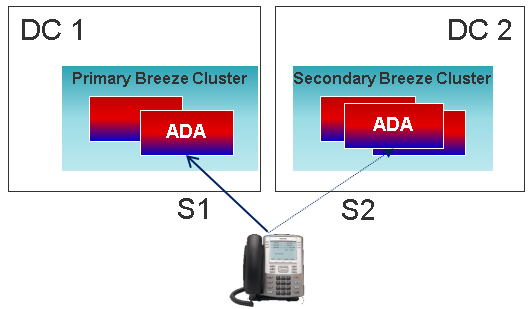
If a UNIStim endpoint loses connectivity, the endpoint tries to register to a node with the required capacity within S1. Although the load balancer of the cluster uses the IP address of S1, the final registration is with a single node in the cluster. The endpoint tries to fail over to S2 only when the connection to all the TPS nodes on S1 is lost, and the load balancer is offline as a result, or if the remaining nodes on S1 do not have the required capacity to support the fail over.
Loss of the primary server (S1) registration connection indicates the node where the phone registered is unavailable. If this happens, the phone tries to register to another node with the required capacity within S1. If no capacity is available on any of the nodes in S1 or if S1 fails to respond, the endpoints try to fail over to S2.
There’s no built-in mechanism to failback IP phones back to S1 (primary).
You may consider two variants now:
-
issuing isetResetAll command, which forces all sets to re-register (all active calls will drop) or
-
issuing disiTPS command, which re-registers sets when they become idle (active calls are not dropped) and prevents new sets from registering. This should be issued on all servers in the Avaya Breeze® cluster (otherwise, sets are going to re-register to other node inside cluster S1).
In the following figure, N1 represents the IP network between the UNIStim endpoint and the Device Adapter node. N2 represents the IP network between the Device Adapter node and the Avaya Aura® components.
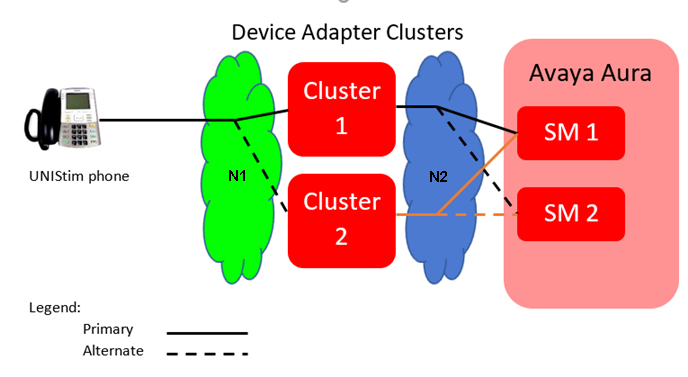
The UNIStim phone registers through the N1 IP network to the Device Adapter node. The solid line represents a registration to the primary cluster S1. The dashed line indicates a possible registration to the alternate cluster S2.
If there is a failure at cluster 1, then either the N1 network, the cluster 1, or the N2 network have experienced an outage, and the endpoint is isolated from the Session Manager and the Avaya Aura® infrastructure. The phone tries registering with cluster 2 by using the dashed line path.
If neither of the registration attempt succeeds, the outage was probably too close to the phone to be resolved by HA and redundancy. For example, the IP cable that connects the phone to the LAN segment may have failed. The phone tries to register periodically until a service personnel rectifies the cable or a LAN device failure and the endpoint registration succeeds.