

AVAYA DOCUMENTATION CENTER
Find answers to your technical questions and learn how to use our products
Avaya Device Adapter Snap-in Reference
Options Menu feature description
The Options Menu button opens a menu to select and modify options on the phone. You can click on the Options button as shown below to access the menu.
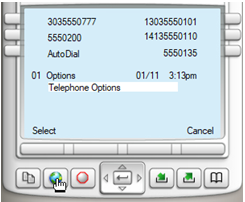
You can select Telephone Options by pressing the Select soft key or Enter in the middle of the navigation buttons to access a set of menu choices.
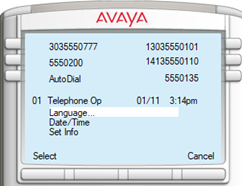
In this case, we can change the language to any other currently loaded in the station firmware, change the date and time, change information about the set including custom labels.
See the user guide for the specific station type to carry out any Options menu handling.
When the user leaves the Options menu or a sub-menu sitting idle for 30 seconds, the station cancels the operation.
This feature is native to the endpoints with the capability, and the menu is controlled only by the presence or absence of a subset of features configured on the endpoint, the firmware. For example, if the firmware does not support Spanish, the option cannot be used in Languages.