AVAYA DOCUMENTATION CENTER
Find answers to your technical questions and learn how to use our products
Avaya Device Adapter Snap-in Reference
Components for configuring Malicious Call Trace as Emergency for call center
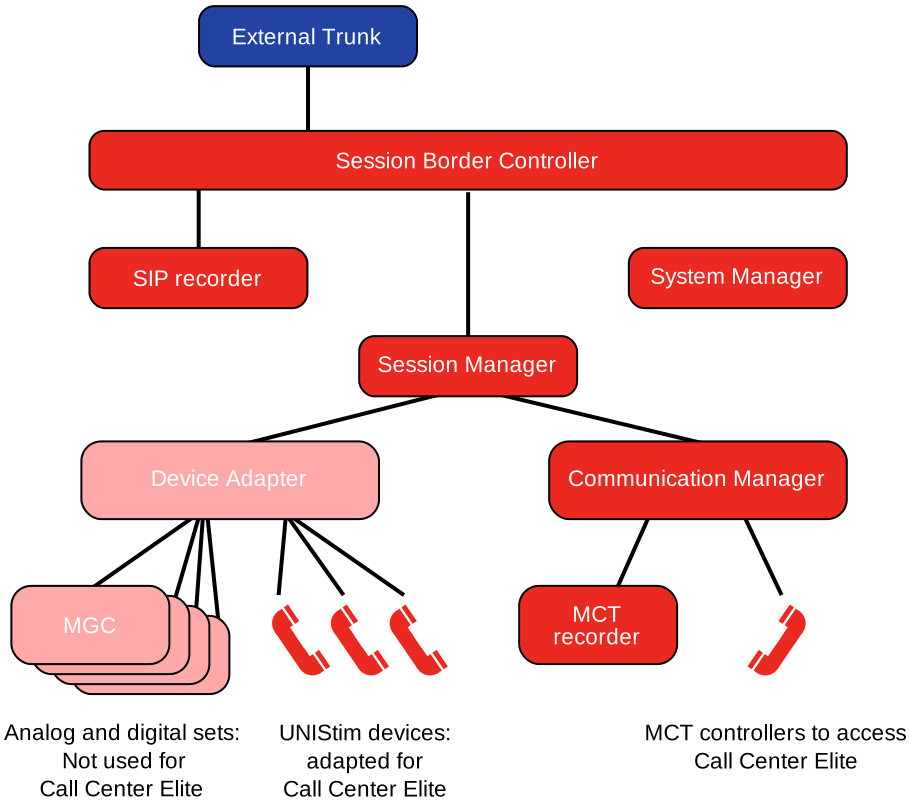
You must configure the following elements to use the MCT feature as Emergency:
Mandatory elements:
-
Configure base MCT on Communication Manager.
-
Configure one or more MCT controller stations. Only H.323 or Communication Manager digital stations are supported, unless you are using attendant consoles as controllers.SIP endpoints are not supported as controllers.
-
Use the CS1K_IPCC station definition to define the applicable Device Adapter agent endpoints and configure the mct-act key for these endpoints.
-
Define the location where MCT reports can be stored or printed.
Optional elements:
-
Other Avaya Aura® SIP devices, if required. These devices can have the mct-act key.
-
A recording trunk group to record malicious calls.In a Call Center Elite environment, the call center records all calls in most cases. Device Adapter does not record calls directly, so the general call recorder is usually configured on the Session Border Controller. Therefore, having a separate call recorder for emergency calls connected to Communication Manager might be considered optional.