AVAYA DOCUMENTATION CENTER
Find answers to your technical questions and learn how to use our products
Avaya Device Adapter Snap-in Reference
Configuring geo-redundant Avaya Breeze® platform clusters for MGCs
- Create two identical clusters, each with its own Cluster IP.
ADDITIONAL INFORMATION:For more information, see
Cluster Administration
in the Administering Avaya Breeze® platform guide. - On System Manager, click .
- On the Manage Elements page, click New.
- On the New Elements page, on the General tab, in the Type field, click Device Adapter Media Gateway.
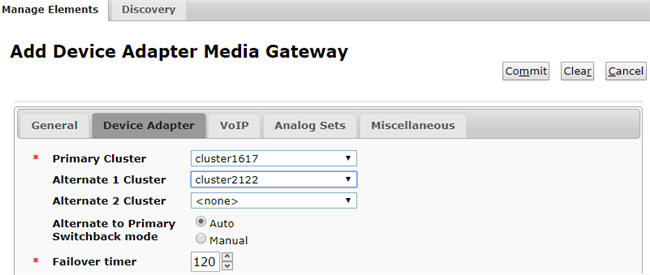
- On the Add Device Adapter Media Gateway page, on the Device Adapter tab, in the Primary Cluster field, click the primary cluster.
- In the Alternate 1 Cluster field, click a geo-redundant cluster for the primary cluster.
- Click Commit.