

AVAYA DOCUMENTATION CENTER
Find answers to your technical questions and learn how to use our products
Avaya Device Adapter Snap-in Reference
Configuring maximum number of devices that can register concurrently for MDA
The following procedure shows extension 2355810 in the domain your.domain.com.
The following procedure has only a single Session Manager. You can configure a secondary Session Manager and add a survivable branch Session Manager. The feature handling is still the same.
- Log on to System Manager by using the appropriate administrative credentials.
- Click .
- Select the user, and then click Edit.
- On the User Profile: Edit: <user name> page, on the Communication Profile tab, click Session Manager Profile.
- In the SIP Registration area, in the Max. Simultaneous Devices field, type the maximum number of devices that can register concurrently.
ADDITIONAL INFORMATION:You can specify a maximum of 10 SIP devices. However, Avaya recommends that out of the 10 SIP endpoints only one endpoint should be a Device Adapter UNIStim endpoint.If the user wants to include two or more Device Adapter endpoints, then Avaya recommends that you set the Max. Simultaneous Devices field value to 1. This is called Sequential Registration and not MDA.
- Do one of the following to determine whether Session Manager should allow new registrations when the maximum number of registered devices is reached:
-
Clear the Block New Registration When Maximum Registrations Active check box to allow Session Manager to register a new device. Session Manager un-registers an existing device that is registered for the longest period of time before registering the new device.
-
Select the Block New Registration When Maximum Registrations Active check box to block new registrations.Select this check box only if you want to force a user to manually log out of an already registered device when the maximum number of registered devices is reached and allow a new registration.
-
- Click Commit.
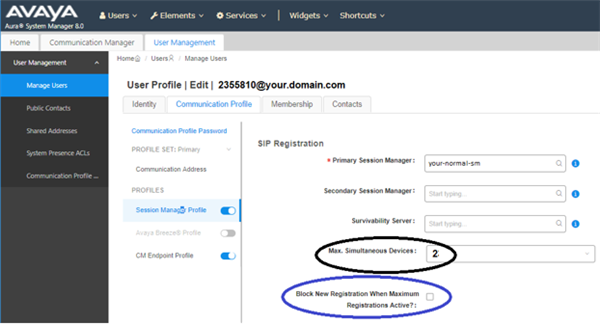
In the preceding example, Max. Simultaneous Devices is set to 2. Which means, only two devices can register at a time. If a third device tries to register, then based on whether you have selected or cleared the Block New Registration When Maximum Registrations Active check box, the new device registration is either blocked or a current device that is registered for the longest period of time is un-registered to allow the new registration. In the preceding example, the device that registered first is un-registered to allow the new registration.
Next steps
You can further configure the station definition for the MDA user extension in Communication Manager or System Manager. For more information, see Configuring the station definition for the MDA user extension.