

AVAYA DOCUMENTATION CENTER
Find answers to your technical questions and learn how to use our products
Avaya Device Adapter Snap-in Reference
Dialing a number from a callers list
The callers list is populated when the call is received. This is the earliest that a name is available. However, there may not be a name present.
You can access the callers list from the soft keys of an idle endpoint.
- Do one of the following to access the callers list:
- On an idle endpoint, press the Callers soft key.
- On an idle endpoint, do the following:
ADDITIONAL INFORMATION:
-
Press the Directory/Log button. This may show an icon or label. For more information, see the user guide for your station type.
-
Scroll down to select the Callers List from the options.
-
Press Select.
-
- Use the up and down arrows to scroll through the stored entries.
ADDITIONAL INFORMATION:You may need to select between Old entries and New entries first.
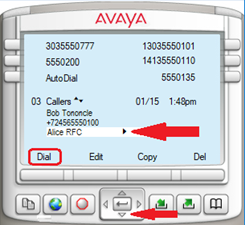 Calls that provide name information display the calling-party name. Otherwise, no name is present.
 - When you select an entry, a triangle facing to the right is present. Use the right arrow to view more details.
ADDITIONAL INFORMATION:You can use the right arrow when a number is displayed. Clicking the right arrow shows the number saved as the name as well as being saved as the number.
- Use the left arrow to return to the list.
- Press dial to call the party.
STEP RESULT:The selected number is dialed using the on-hook dialing feature and the dialed number does not have to match against the dial plan.