AVAYA DOCUMENTATION CENTER
Find answers to your technical questions and learn how to use our products
Avaya Device Adapter Snap-in Reference
Phased migration by using ProVision
This topic provides a high-level overview of using ProVision and the associated Nortel Migration Tool (NMT) to migrate existing CS 1000 endpoints to an Avaya Aura® solution.
-
For migrating digital and analog endpoints, consider the following:
-
Migrate all endpoints that are connected to a given MGC during the same phase.
-
Manually account for analog directory numbers (DNs) created on Phantom type superloops. DNs on Phantom loops are virtual and are not connected to physical endpoints.
-
-
After you retrieve the CS 1000 data into ProVision, you can modify individual table records. Do not delete any table record. Removing records could negatively affect the built-in logic of the Nortel Migration Tool due to data interdependencies.
-
The following are the two options for phased migration of endpoints by using ProVision and the associated NMT:
-
Use NMT to map all extensions:
-
You can run NMT once and map all sets. You can group the endpoints later by using ProVision.
-
To support the procedure of grouping the endpoints, you must reference the source CS 1000 cs dnb and cs tnb tables along with the target Communication Manager station table in ProVision.
-
After grouping the stations, create separate configuration folders, which are copies of the one populated by NMT run for the target Communication Manager and System Manager.
-
You can modify tables in each configuration folder so that the tables contain the stations to migrate in the phase.
-
-
Use NMT to map selected extensions:
-
Use ProVision to reference the source CS 1000 cs dnb and cs tnb tables to select and group the endpoints.
-
You must run NMT every time for each planned migration phase. NMT maps only the endpoints that you select for a given migration phase during the process.
-
Each time you run NMT, it uses the same configured settings, especially the extension range that you provide in the Additional Extension Pool field of NMT.For more information, see Migrating the endpoint and MGC-related data.You must create separate configuration folders for the target Communication Manager and System Manager for each migration phase.
-
For more information, see the ProVision and Nortel Migration Tool documentation. -
-
After you run the Send Stations transaction on ProVision to migrate the data to the target Communication Manager, examine the event log of ProVision. The event log contains problems that are reported by the Communication Manager. Investigate and rectify any warnings or errors before you proceed with the migration process.
-
Use the File Connection feature of ProVision to support retrieving and sending transactions between ProVision and System Manager. Do the following:
-
Export existing users from System Manager.
-
Use the XML file that you exported as the preferred connection of the target System Manager in ProVision.
-
After you add new users to the XML file using the Send Transactions feature of ProVision, import the XML file into System Manager.
For more information, see the ProVision Job Aid, SMGR Connection Methods on the Avaya ProVision website. -
Caveats
-
For CS 1000 analog stations, there is a cross-platform analog to SIP limitation for Communication Manager version that is supported with the respective Device Adapter version.The behavior for Multiple Appearance Directory Number on analog sets are always Multiple Call Arrangement and is not set to Single Call Arrangement. That is, each endpoint may make an individual outgoing call, and any idle endpoint can receive an incoming call. However, because these are MCA, none of the other users sharing the number can bridge into it.The analog station is defined as a SIP station and has virtual buttons to handle the line appearances, including the appearance used to transfer a call or create a conference. When these are shared, the appearances for the analog stations are defined as bridged appearances. As no privacy release key is available, all brdg-appr buttons in the analog stations are created as Bridged: all (B: a) buttons instead, concrete index “B: <number>” (Bridged: specific call appearance).
-
ProVision and Nortel Migration Tool functions need Class-of-Service (COS) tables. This provides the default settings that can be used to set the following parameters for migrated stations:
-
Bridging Exclusion Override
-
Automatic Exclusion (privacy settings to enable privacy release)
-
Automatic Callback (ring again)
The administrator must ensure that sufficient COSs are administered with the desired values. This can be done directly on Communication Manager or System Manager. -
-
ProVision and Nortel Migration Tool functions need Class-of-Restriction (COR) tables. This provides the default settings that can be used to set the following parameters for migrated stations:
-
Can Be Picked Up By Directed Call Pickup
-
Can Use Directed Call Pickup
The administrator must ensure that sufficient CORs are administered with the desired values. This can be done directly on Communication Manager or System Manager. -
-
Call pickup groups can include only 100 users.
-
Extended call pickup groups can include only 25 call pickup groups.
-
CS 1000 based Call Park makes use of an independent Avaya Breeze® platform snap-in. This is not created by migrating data from CS 1000 using ProVision tools. CS 1000 based Call Park is defined in Avaya Aura® as Call Park and Page.The administrator must pre-install the Call Park and Page snap-in on an independent Avaya Breeze® platform server and cluster. Device Adapter cannot be co-located in the same Avaya Breeze® platform as the Call Park and Page snap-in.
-
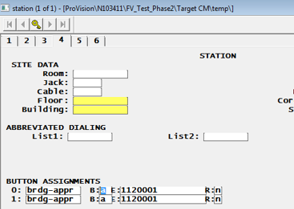
Migration of analog stations may leave a single bridged appearance button as Button 0 in the configuration tables. If this occurs, the analog station fails to transfer or conference calls.To resolve this problem, edit the station definition and copy the Button 0 configuration to Button 1, as shown in the following illustration. Ensure that this is Bridged all (B:a).