

AVAYA DOCUMENTATION CENTER
Find answers to your technical questions and learn how to use our products
Avaya Device Adapter Snap-in Reference
Configuring Speed Call Controller for Soft Keys
This procedure is applicable only for group lists. System and enhanced lists require administrator programming. Users can always modify personal lists.
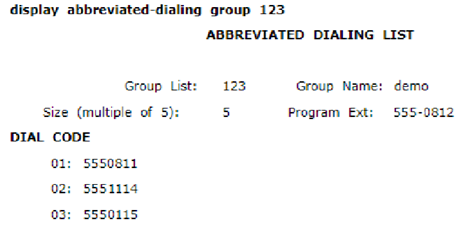
- Define the Abbreviated Dialing group to be used.
ADDITIONAL INFORMATION:For the procedure to create the list, see
Abbreviated Dialing
in the Avaya Aura® Communication Manager Feature Description and Implementation guide. - Specify the phone extension as Program Ext in the Abbreviated Dialing group list. Note that only one dedicated extension can program a group list.
ADDITIONAL INFORMATION:
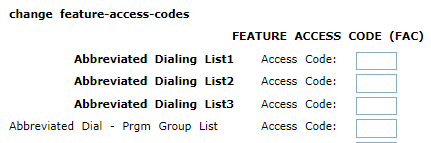
- Define the Abbreviated Dial Prgm_Group_List FAC.
ADDITIONAL INFORMATION:
- Do the following, while creating or changing the station:
- Set the Abbreviated Dialing list as the station’s abbreviated list 1, 2, or 3.
ADDITIONAL INFORMATION:For the procedure to allow a station to use the list, see
Assigning telephones for group lists
inChapter 4: Abbreviated Dialing
, in the Avaya Aura® Communication Manager Feature Description and Implementation guide. - Add the feature mnemonic SCKCx where x is the abbreviated dial list number (1–3) on the station.
ADDITIONAL INFORMATION:Note:This user can both change and use the list. Only one controller can be defined per group abbreviated dial list.
- Set the Abbreviated Dialing list as the station’s abbreviated list 1, 2, or 3.